The Siemens Community Catalyst program was co-created with our community to acknowledge technology leaders who consistently contribute to the Siemens Community. Nominations are accepted on a rolling basis.
Licensed software on an old PC. I no longer have access to it. It was the student license. Is it possible to deactivate the license on the old computer and use that same license on my new computer?
HI,
Your previous license key activation is now deactivated in Altair one, you can now reactivate the student license with the same license key.
Deactivation and reactivation feature is only if a computer breaks down and is only allowed a few times per user.
You can deactivate the license from one machine and reactivate in another by yourself if you have access to both machines as per –
https://community.altair.com/discussion/34280/altair-student-edition-deactivate-from-one-computer-to-activate-in-another-in-the-rare-case-a-computer-is-lost-or-malfunctional#latest
Hi, I'm having the same problem. My old laptop broke down and now I'm trying to install my student license in my new laptop. Can you help me deactivate the license in the old laptop?
Hi, I have the same issue. I am trying to install Altair Psim on a new laptop. Could you help me deactivate the license on the old PC?
P/S: Thank you I followed your instruction and successfully deactivate the license
HI @Hungndb
Deactivation and reactivation feature is only if a computer breaks down or reformatted and is only allowed a few times per user preprogrammed into the system.
hi, my computer crashed and i am unable to deactivate the license to use it on my new computer. Any assistance would be greatly appreciated
Hi @Rahul_P1
I activated the license in the new laptop last month and it was working, but now it is not working anymore. The message shows error codes 9 and -40. Could you please help me to solve this
Thanks
@Owen_Andall
Please see -
@Hungndb
Your university has both purchased licenses and you have the student edition,
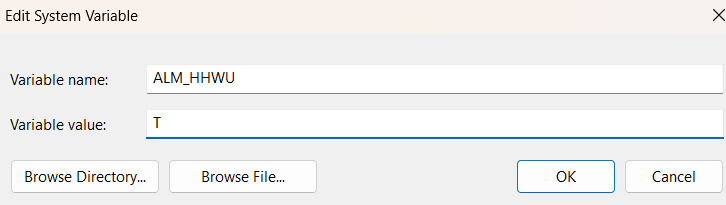
You can switch between the managed licenses in Altair one and the free student edition by setting an environment variable with name: ALM_HHWU and value T for using the managed licenses and with value F to force the system to use the student edition license key.
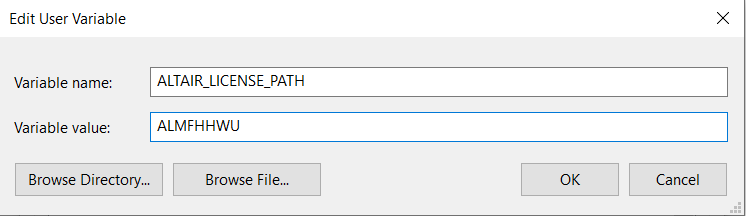
Thanks for your instruction, I tried by setting environment variable like this figure, but there is still errors 9, 6 and -40
You will need to create a system variable as shown below
with value T or F as explained.
Join us for a community conversation on how High-Performance Computing (HPC) and Simcenter PSIM work together to meet the increasing demands of modern power electronics simulation. During this one-hour technical session, you'll discover how leveraging HPC can speed up simulations, improve scalability, and empower engineers…
Join us for a community conversation on accelerating your motor simulation workflow with Simcenter Simlab. In this beginner-friendly session, we'll introduce the platform's automated model-building capabilities and show how easy it is to set up your first electric motor analysis. You'll see the basic steps of geometry…
Join us for a Community Conversation where we'll discuss practical approaches to analyzing complex electromagnetic models using hybrid solver techniques. This session will provide a general overview of how different computational methods can be combined within a single simulation to address models containing varied…