The Siemens Community Catalyst program was co-created with our community to acknowledge technology leaders who consistently contribute to the Siemens Community. Nominations are accepted on a rolling basis.
Hi,
I want to change initial velocity of this model;.
Thanks.
Baeseonghun
Hi Baesh,
In the model file attached there are no loads or boundary conditions.
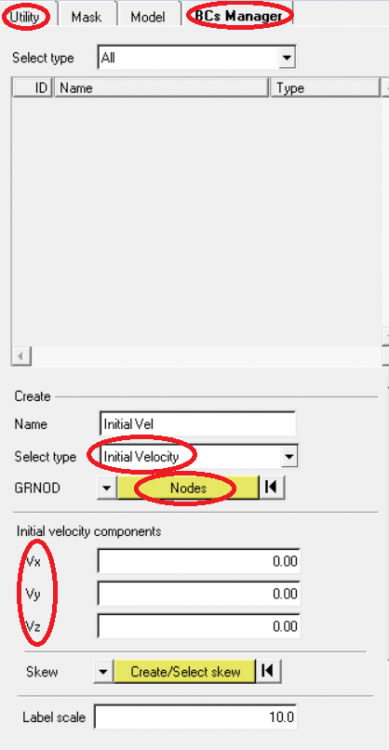
To provide an initial velocity in the model, Please go to Utility Menu in the model browser and select BC's Manager. Provide a name for the load collector and select the type as Intial Velocity from the menu. Then select the nodes or parts where velocity is to be applied and then provide the velocity in the required direction (Vx or Vy or Vz).
Please find the attached image.
Meanwhile, please go through this video series where pre-processing for crash analysis is shown as an interactive tutorial. All aspects of FE modelling are covered here with a full car model. Creating initial velocity and boundary conditions are shown here. Please access the videos at : http://www.altairuniversity.com/getting-started/learn-radioss-training-webinars/
We have an online learning and certification program for Altair products. All aspects of explicit analysis using RADIOSS is also covered there. Please access http://certification.altairuniversity.com/ for more details.
<?xml version="1.0" encoding="UTF-8"?>
Join us for a Community Conversation where we'll discuss practical approaches to analyzing complex electromagnetic models using hybrid solver techniques. This session will provide a general overview of how different computational methods can be combined within a single simulation to address models containing varied…
Join us for a community conversation to explore how different modeling approaches in Simcenter PSIM can help engineers simulate power electronics systems while balancing accuracy, simulation speed, and design insight. What you'll learn: Power transistor modeling : Thermal and high fidelity models Protection component…