The Siemens Community Catalyst program was co-created with our community to acknowledge technology leaders who consistently contribute to the Siemens Community. Nominations are accepted on a rolling basis.
Hi!
Maybe this is a stupid question: How do I make sure that my mesh has the correct size so that the unit match to the one from the CT. I use MITK GEM to segment and export/import it as STL from there to Hypermesh.
Thanks a lot!
Best, J
Hi,
You have to use the Distance panel (F4) to determine the distance between two nodes/points and thereby has to maintain a consistent unit system.
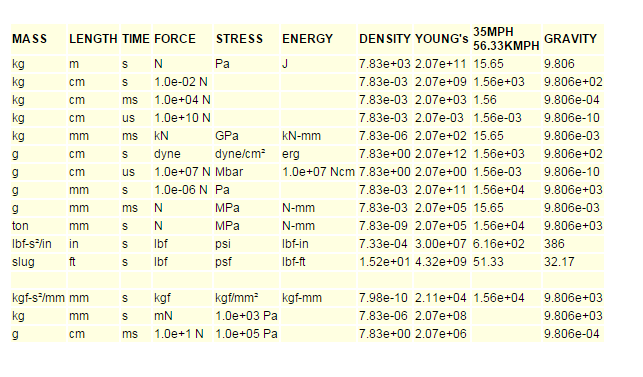
Attaching is the normal unit consistency followed across industries.
<?xml version="1.0" encoding="UTF-8"?>
Hi George!
I'm not sure if you understood my correctly: After segmenting an object from a CT and importing it to hypermesh I have a certain size. When I measure a distance with F4 how do I know the units of this measurement? And how do I make sure that this is the correct size? What is the standard way to make sure that the sizes correspond to the CT?
Thanks for your help!!
Best, Jonas
Hi Jonas,
From the distance between the nodes it is possible to make out the unit.As an eg, if the distance between two nodes is shows as .001 we can summarize it is in metres and possibly the unit system followed is kg, m, s. You can scale the model to match the required size.
Hypermesh displays distance based on unit system you have followed in CAD software.If it is not correct, then while importing files you have option to scale geometry.
If modelled using inches & in Hm, if you want mm then give scale factor of 25.4.
For STL files you can use Tools : Scale option for scaling surface or solid.
Join us for a community conversation on how High-Performance Computing (HPC) and Simcenter PSIM work together to meet the increasing demands of modern power electronics simulation. During this one-hour technical session, you'll discover how leveraging HPC can speed up simulations, improve scalability, and empower engineers…
Join us for a community conversation on accelerating your motor simulation workflow with Simcenter Simlab. In this beginner-friendly session, we'll introduce the platform's automated model-building capabilities and show how easy it is to set up your first electric motor analysis. You'll see the basic steps of geometry…
Join us for a Community Conversation where we'll discuss practical approaches to analyzing complex electromagnetic models using hybrid solver techniques. This session will provide a general overview of how different computational methods can be combined within a single simulation to address models containing varied…