The Siemens Community Catalyst program was co-created with our community to acknowledge technology leaders who consistently contribute to the Siemens Community. Nominations are accepted on a rolling basis.
Hello,
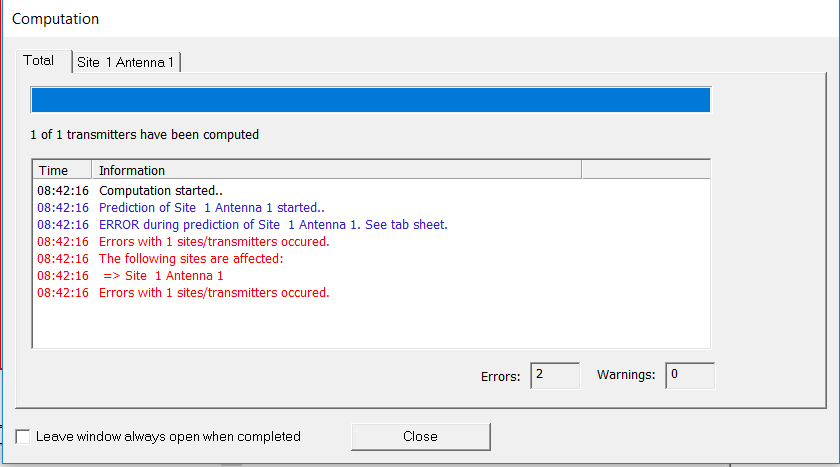
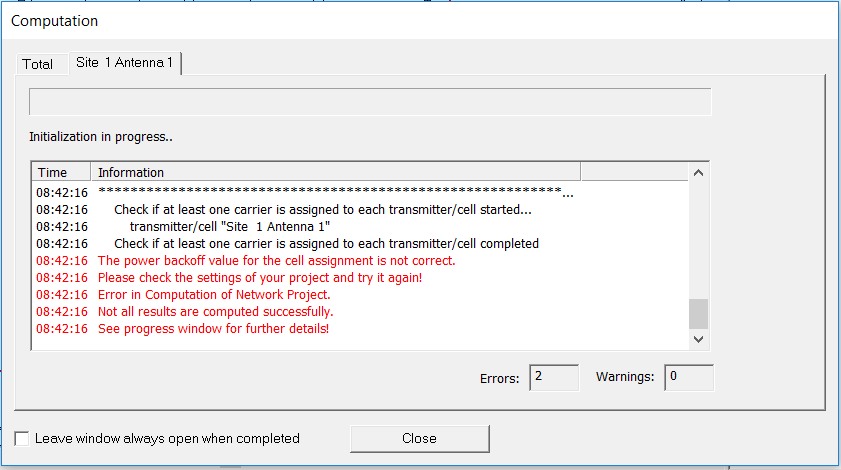
For few days I cant fix that problem in the picture, it is puzzling beacuse earlier it worked on the same settings. I consuled with doctor about this, all parameter are well set.
<?xml version="1.0" encoding="UTF-8"?>
Hi Derhen,
Is it possible to attach the model files that we can have a look at the setup.
Hi Dewald
This is the all files that I use.
Unable to find an attachment - read this blog
To reproduce the problem, we need a little more. Can you please use File / Export / Export Project as ZIP Archive and provide the resulting zip file?
Hi mvogel
I made according to your instructions.
Got it, thanks.
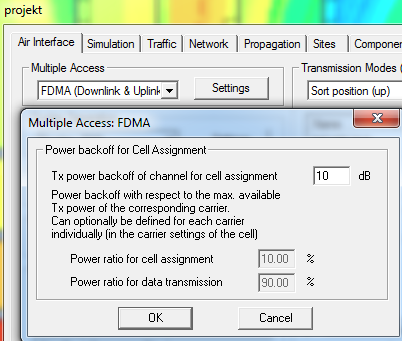
Under Project / Edit Project Parameter - Air Interface tab, click on the Settings button next to Multiple Access FDMA.
There, Power Backoff for Cell Assignment is defined. In your project, it is set to 0 dB. That means that 100% of the power is used for cell assignment (zero dB = 1 = 100%) and no power is available for data transmission. WinProp apparently doesn't like that. When I change that to 10 dB backoff, then 10% of the power is available for cell assignment (-10 dB = 0.1 = 10%). That leaves 90% of the power for data transmission. WinProp likes that better, and the simulation runs.
Thank you mvogel I appreciate it!
Join us for a community conversation on how High-Performance Computing (HPC) and Simcenter PSIM work together to meet the increasing demands of modern power electronics simulation. During this one-hour technical session, you'll discover how leveraging HPC can speed up simulations, improve scalability, and empower engineers…
Join us for a community conversation on accelerating your motor simulation workflow with Simcenter Simlab. In this beginner-friendly session, we'll introduce the platform's automated model-building capabilities and show how easy it is to set up your first electric motor analysis. You'll see the basic steps of geometry…
Join us for a Community Conversation where we'll discuss practical approaches to analyzing complex electromagnetic models using hybrid solver techniques. This session will provide a general overview of how different computational methods can be combined within a single simulation to address models containing varied…