The Siemens Community Catalyst program was co-created with our community to acknowledge technology leaders who consistently contribute to the Siemens Community. Nominations are accepted on a rolling basis.
In explosive analysis, I was able to see Burn Fraction time history plot by using variable 'BFRAC' under Output Block.
How to see animation contours of such variables?
What options should I change in the engine file to achieve this?
Hi Prashanth,
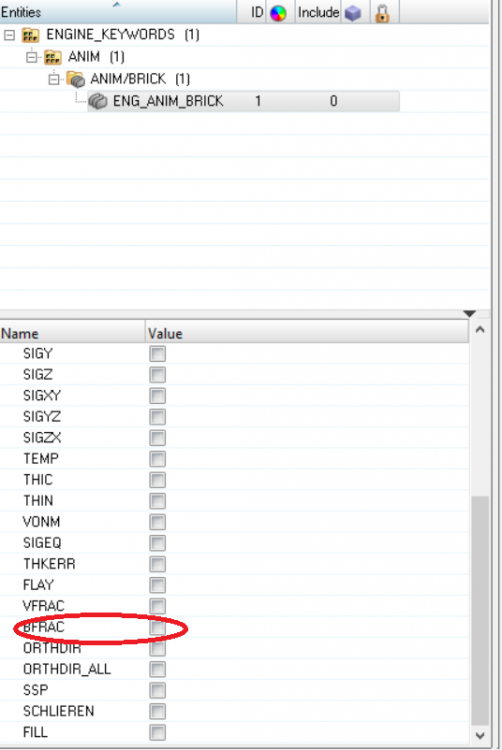
Please input /ANIM/BRICK/BFRAC in the engine file for generating animation files for burn fraction.
Hi Prashanth, Please input /ANIM/BRICK/BFRAC in the engine file for generating animation files for burn fraction.
@George P Johnson,
Is it possible that the option that you said is a newer one.
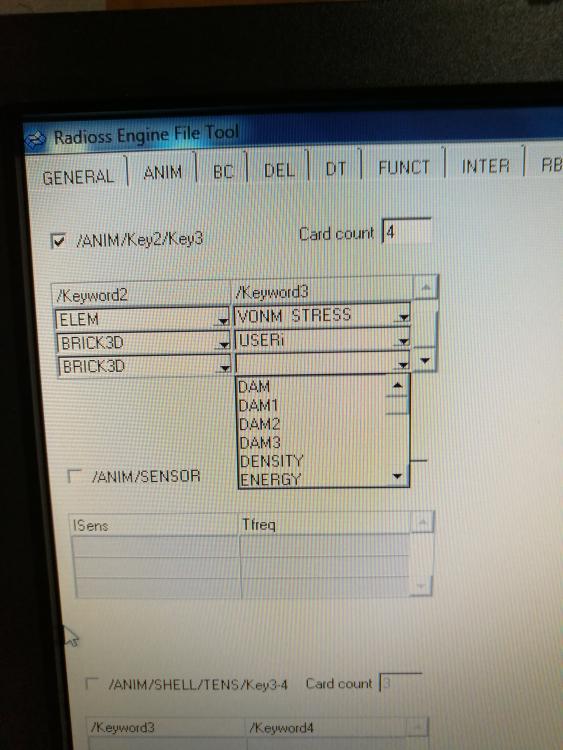
Because, we use HyperWorks 10.0 and we couldn't find the option BFRAC for BRICK3D.
The options start at D. There's no option that starts with B.(Alphabetical order)
Can we do anything with USRi?
<?xml version="1.0" encoding="UTF-8"?>
You can manually type in this command in the engine file.
In the latest version (HyperWorks 2017) we can directly input this command.
Meanwhile, please upgrade HyperWorks to the latest edition,HyperWorks 2017 and you can download the same from: https://connect.altair.com/
Typing it manually in the unsupported cards tab of engine file had no effect.
Does this mean that v10.0 doesn't support showing BFRAC as contour?
In such a case I doubt whether it is supported in v10. You can try the same in the latest HW version.
Else, you can forward me the file through the secure dropbox so that I can run and check the same.
Join us for a community conversation on how High-Performance Computing (HPC) and Simcenter PSIM work together to meet the increasing demands of modern power electronics simulation. During this one-hour technical session, you'll discover how leveraging HPC can speed up simulations, improve scalability, and empower engineers…
Join us for a community conversation on accelerating your motor simulation workflow with Simcenter Simlab. In this beginner-friendly session, we'll introduce the platform's automated model-building capabilities and show how easy it is to set up your first electric motor analysis. You'll see the basic steps of geometry…
Join us for a Community Conversation where we'll discuss practical approaches to analyzing complex electromagnetic models using hybrid solver techniques. This session will provide a general overview of how different computational methods can be combined within a single simulation to address models containing varied…