Overview:
This extension serves as a post-processing tool performing Gap analysis using result file loaded in session and exports a new H3D file with Minimum distance datatype. Key details:
- Supported OS: Windows and Linux
- Clients: HyperView (General and Multicore)
- Minimum Version Required: 2026
Usage/Installation Instructions:
1. Unzip GapAnalysis_extension.zip
2. Register the extension in HyperView via File>Extensions.
3. Once registered, the extension will appear in the Extension Manager. You can click on View Documentation to view detailed documentation for the usage of the extension.
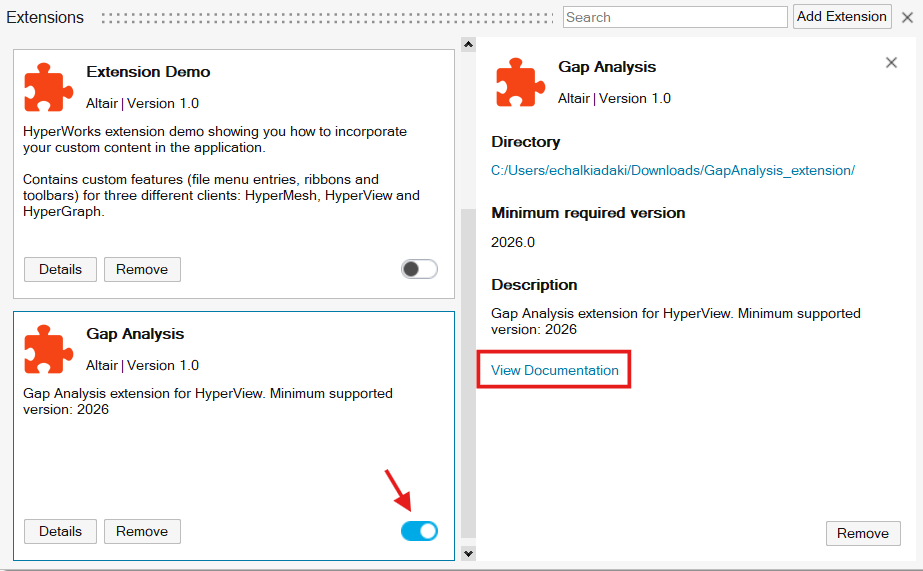
4. Enable the extension using the toggle button. A new Gap Analysis ribbon will appear.

5. Click Gap Analysis to start
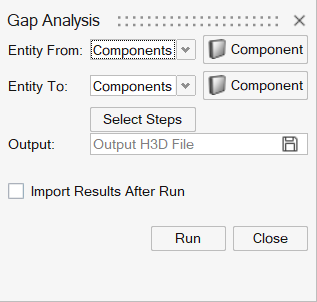
Extension
Demo Video
Known limitations
- MBD cases are not supported
- Make sure that filepath of the model file does not have comma (,)
