The Siemens Community Catalyst program was co-created with our community to acknowledge technology leaders who consistently contribute to the Siemens Community. Nominations are accepted on a rolling basis.
Hello,
I have several questions on Altair UltrafluidX:
Thank you.
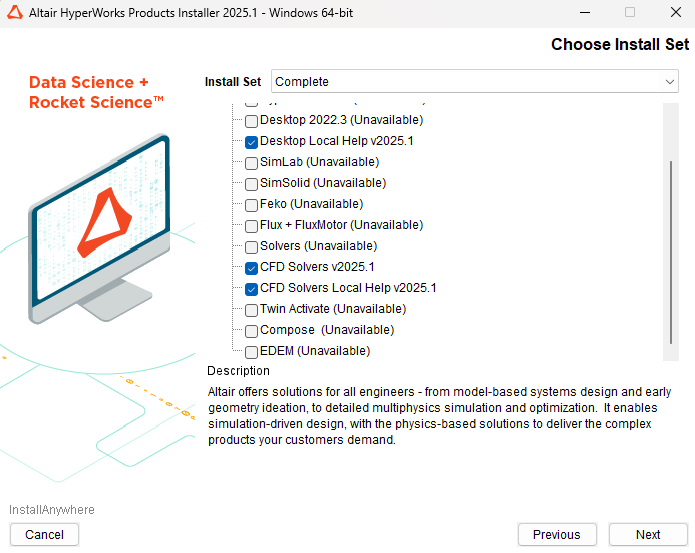
You will need the HyperMesh CFD and CFD Solvers packages. Setup is done within HyperMesh CFD.
That GPU has only 4 GB RAM - so maybe you can do some very small models. Anything more industrial typically requires multiple (4 to 8) high-end GPUs - A100, H100, etc.
This is a good starting point for a UFX tutorial. https://help.altair.com/hwdesktop/cfd/topics/tutorials/hwcfd/automotive_external_aero_chapter.htm
and the main Help page here: https://help.altair.com/hwcfdsolvers/ufx/index.htm
Thanks, Acupro. However, I still cannot find the "hwVirtualWindTunnelUltraFluidX2025.1_win64.exe" file mentioned in the user guide, and when I launch HyperMeshCFD, it directly takes me to the General purpose CFD - Acusolve.
Could you please tell me what the fix is?
I do not have this option:
This interface is now obsolete. Make the necessary definitions in the HyperMesh CFD interface instead. (Aerodynamics and aeroacoustics). https://help.altair.com/hwdesktop/cfd/topics/chapter_heads/solution_layers_r.htm
According to the install guide - Chapter 3 - you should just download/install this package AxhwHyperMeshCFD2025_1_win64.exe or for Linux AxhwHyperMeshCFD2025_1_linux64.bin Is that what you've done? Maybe try re-install?
Join us for a community conversation on how High-Performance Computing (HPC) and Simcenter PSIM work together to meet the increasing demands of modern power electronics simulation. During this one-hour technical session, you'll discover how leveraging HPC can speed up simulations, improve scalability, and empower engineers…
Join us for a community conversation on accelerating your motor simulation workflow with Simcenter Simlab. In this beginner-friendly session, we'll introduce the platform's automated model-building capabilities and show how easy it is to set up your first electric motor analysis. You'll see the basic steps of geometry…
Join us for a Community Conversation where we'll discuss practical approaches to analyzing complex electromagnetic models using hybrid solver techniques. This session will provide a general overview of how different computational methods can be combined within a single simulation to address models containing varied…