The Siemens Community Catalyst program was co-created with our community to acknowledge technology leaders who consistently contribute to the Siemens Community. Nominations are accepted on a rolling basis.
I am trying to get the Node Coordinates of a body in a local coordinate system in HyperView using TCL. Hence I am using tracking system option and using Query (Table) to fetch the results.
How to enable Node Coordinates (Tracked) in Query using TCL? In documentation of https://2023.help.altair.com/2023.1/hwdesktop/hwd/topics/reference/tcl/poiqueryctrl_setquery.htm#error I was not able to find the option to do this.
Thanks in advance,
Akash P
Hello @Akash Purushothaman
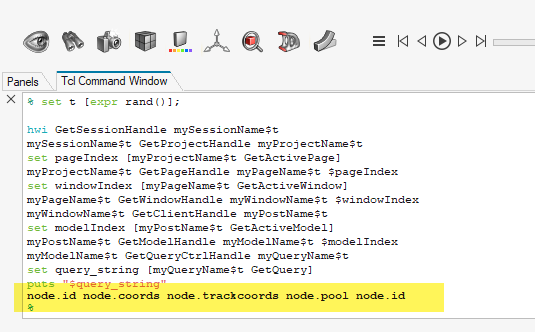
you can do a query manually through GUI, and then use below code to get the query string of it:
set t [expr rand()];
hwi GetSessionHandle mySessionName$t mySessionName$t GetProjectHandle myProjectName$t set pageIndex [myProjectName$t GetActivePage] myProjectName$t GetPageHandle myPageName$t $pageIndex set windowIndex [myPageName$t GetActiveWindow] myPageName$t GetWindowHandle myWindowName$t $windowIndex myWindowName$t GetClientHandle myPostName$t set modelIndex [myPostName$t GetActiveModel] myPostName$t GetModelHandle myModelName$t $modelIndex myModelName$t GetQueryCtrlHandle myQueryName$t set query_string [myQueryName$t GetQuery] puts "$query_string"
For your case it is "node.trackcoords"
Regards, Sebastian Karp
Join us for a community conversation on how High-Performance Computing (HPC) and Simcenter PSIM work together to meet the increasing demands of modern power electronics simulation. During this one-hour technical session, you'll discover how leveraging HPC can speed up simulations, improve scalability, and empower engineers…
Join us for a community conversation on accelerating your motor simulation workflow with Simcenter Simlab. In this beginner-friendly session, we'll introduce the platform's automated model-building capabilities and show how easy it is to set up your first electric motor analysis. You'll see the basic steps of geometry…
Join us for a Community Conversation where we'll discuss practical approaches to analyzing complex electromagnetic models using hybrid solver techniques. This session will provide a general overview of how different computational methods can be combined within a single simulation to address models containing varied…