The Siemens Community Catalyst program was co-created with our community to acknowledge technology leaders who consistently contribute to the Siemens Community. Nominations are accepted on a rolling basis.
Greatly appreciate the opportunity afforded by this forum to submit a query.
For a bunch of solids unioned & parameterised together, scaling them scales them in place and draws them apart. Is there a way that they scale but stay together?
Best,
GS
You may need to use the Origin box of the Scale transform. But it may mean that you will need a different Origin value for each solid, depending on how/where you created these solids.
Thank you, Sir.
The scaling, as you show it using the scale box. I found does keep the unioned group intact.
My concern was that changing the parameter that parameterises all the solids in the union results in them scaling but drawing apart.
Any advice to achieve this would be useful.
Regards,
Please attach a simple example showing (1) the current problem and (2) the desired result.
Thank you for the prompt response. Sir.
I have attempted to show the problem in a short video:
https://www.youtube.com/watch?v=fHKuJhZZnEA
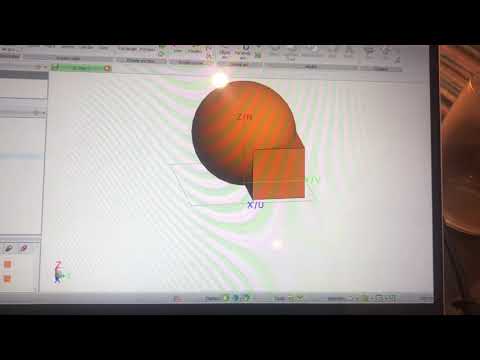
Here is a simpler view of current problem and desired result:
Situation: Two solids are unioned and parameterised with the same variable.
Current Problem:
RESULT: Unioned solids scale but draw apart
Desired Result
RESULT: Unioned solids scale but stay together
When you create the solids, use the workplane tab to set their individual locations. For example create a cuboid with the Workplane:
And for the sphere for example:
You can use variables inside the workplane definitions to make it parametric and when you scale each solid CADFEKO will remember the workplane settings parameters:
You can of course use script recording and playback to automate everything.
When you create the solids, use the workplane tab to set their individual locations. For example create a cuboid with the Workplane: And for the sphere for example: You can use variables inside the workplane definitions to make it parametric and when you scale each solid CADFEKO will remember the workplane settings parameters: You can of course use script recording and playback to automate everything.
I will attempt to do this.
Thank you for your prompt advice, Sir.
Join us for a community conversation on how High-Performance Computing (HPC) and Simcenter PSIM work together to meet the increasing demands of modern power electronics simulation. During this one-hour technical session, you'll discover how leveraging HPC can speed up simulations, improve scalability, and empower engineers…
Join us for a community conversation on accelerating your motor simulation workflow with Simcenter Simlab. In this beginner-friendly session, we'll introduce the platform's automated model-building capabilities and show how easy it is to set up your first electric motor analysis. You'll see the basic steps of geometry…
Join us for a Community Conversation where we'll discuss practical approaches to analyzing complex electromagnetic models using hybrid solver techniques. This session will provide a general overview of how different computational methods can be combined within a single simulation to address models containing varied…