The Siemens Community Catalyst program was co-created with our community to acknowledge technology leaders who consistently contribute to the Siemens Community. Nominations are accepted on a rolling basis.
How can I specify an enforced displacement in a subcase (or loadstep) in an OptiStruct input deck?
There are two ways to do this:
1. Create a single SPC definition containing the enforced displacement information and reference this within the subcase (loadstep) definition.
2. Create an SPC, SPCD pair, with the SPC constraining the dof that is to have the enforced displacement and the SPCD defining the magnitude and dof of the enforced displacement. Both must be referenced in the subcase (loadstep) definition.(SPCD is defined within the constraints panel: change the 'loadtype' from SPC (default) to SPCD
There are two ways to do this:1. Create a single SPC definition containing the enforced displacement information and reference this within the subcase (loadstep) definition.2. Create an SPC, SPCD pair, with the SPC constraining the dof that is to have the enforced displacement and the SPCD defining the magnitude and dof of the enforced displacement. Both must be referenced in the subcase (loadstep) definition.(SPCD is defined within the constraints panel: change the 'loadtype' from SPC (default) to SPCD
2. Create an SPC, SPCD pair, with the SPC constraining the dof that is to have the enforced displacement and the SPCD defining the magnitude and dof of the enforced displacement. Both must be referenced in the subcase (loadstep) definition.
(SPCD is defined within the constraints panel: change the 'loadtype' from SPC (default) to SPCD
Thanks Rahul for sharing this information. I have another question. Do you know how to assign SPCD with local coordinate system defined by users. Thank you very much
Hi,
SPC, SPCD is applied to displacement system (nastran call Global System). This system is referred by GRID
so after making local system you enter subpanel 'assign' to assign SPCD nodes to displacement system as your local system
If the direction of the enforced displacement is different from the global co-ordinates X,Y or Z, then 1. Create a local co-ordinate system. 2. Assign the nodes to that local co-ordinate system from 1D >> Systems 3. Pick the nodes, system and then click on set displacement4. Then create an enforced displacement using the constraints panel.
Thanks guys a lot. I have already done it successfully. That sounds cool!
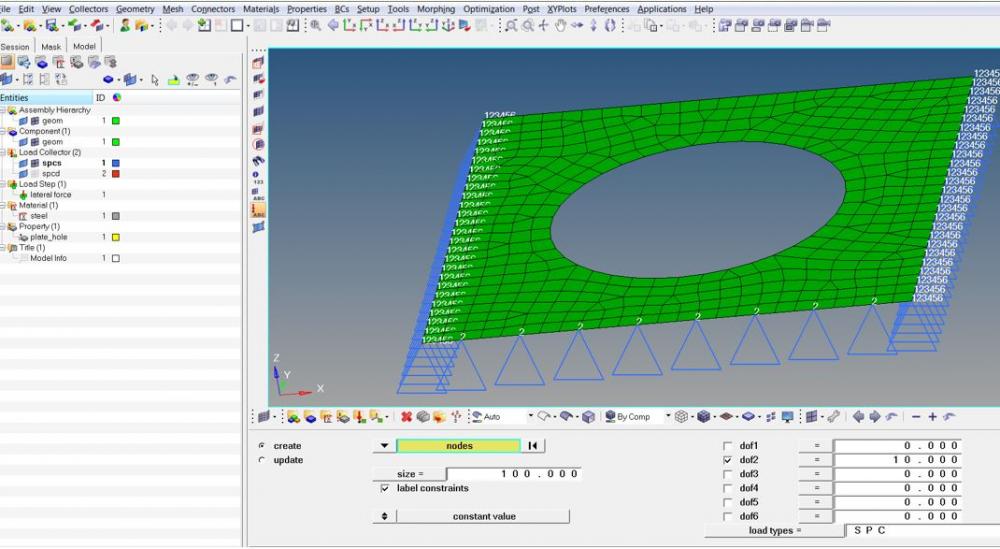
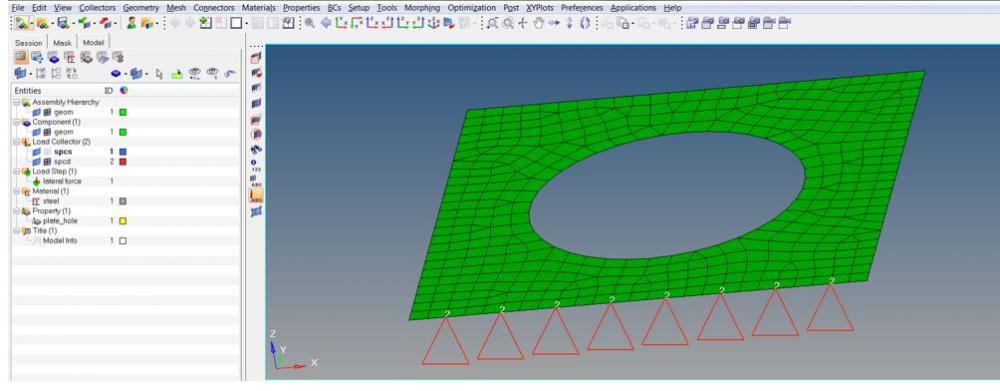
Hi Rahul, I am using HyperMesh and Optristruct. My problem is 2D. I want to apply enforced displacement. As per your suggestion, I have created two load collectors. SPC for constraining DoF (in my case x or 1 and y or 2 unmarked) for all nodes. Another load collector SPC with load type SPCD and respective displacements. Now in my loadstep how do I use these two load collectors? As per the menu in HyperMesh, I can only choose one SPC, where do I put another load collector (SPCD)? Please correct me if I am wrong somewhere.
Hi Jaimit Gandhi,
Maybe attached pictures can help you /emoticons/default_smile.png' srcset='/emoticons/smile@2x.png 2x' title=':)' width='20'>
<?xml version="1.0" encoding="UTF-8"?>
HI Rahul,
I have a question regarding translation of a local co-ordinate system to which number of nodes are assigned.
When i am translating the local co-ordinate system nodes assigned to it are also moving resulting in element distortion.
Is there a way i can translate my local co-ordinate system without affecting the nodes assigned to it.
Thank you
Regards
Yasir
You can select the nodes in question, and assign them (set reference and displacement) to the global system. (the coordinate system always visible in the bottom corner of the screen) then move the coordinate system.
Join us for a community conversation on how High-Performance Computing (HPC) and Simcenter PSIM work together to meet the increasing demands of modern power electronics simulation. During this one-hour technical session, you'll discover how leveraging HPC can speed up simulations, improve scalability, and empower engineers…
Join us for a community conversation on accelerating your motor simulation workflow with Simcenter Simlab. In this beginner-friendly session, we'll introduce the platform's automated model-building capabilities and show how easy it is to set up your first electric motor analysis. You'll see the basic steps of geometry…
Join us for a Community Conversation where we'll discuss practical approaches to analyzing complex electromagnetic models using hybrid solver techniques. This session will provide a general overview of how different computational methods can be combined within a single simulation to address models containing varied…