The Siemens Community Catalyst program was co-created with our community to acknowledge technology leaders who consistently contribute to the Siemens Community. Nominations are accepted on a rolling basis.
Please, what is the purpose of the "surface to surface" and "clearance" parameters ? When should one or another be enabled?
Hi Rita,
these are more related to the solver that you are using, in this case OptiStruct.
Clearance allows the user to pre-define the clearance/gap in a contact independently of the actual node distance. This can be used when the mesh is not so good, and you want to define a pre-defined gap (even negative for interference/press-fit).
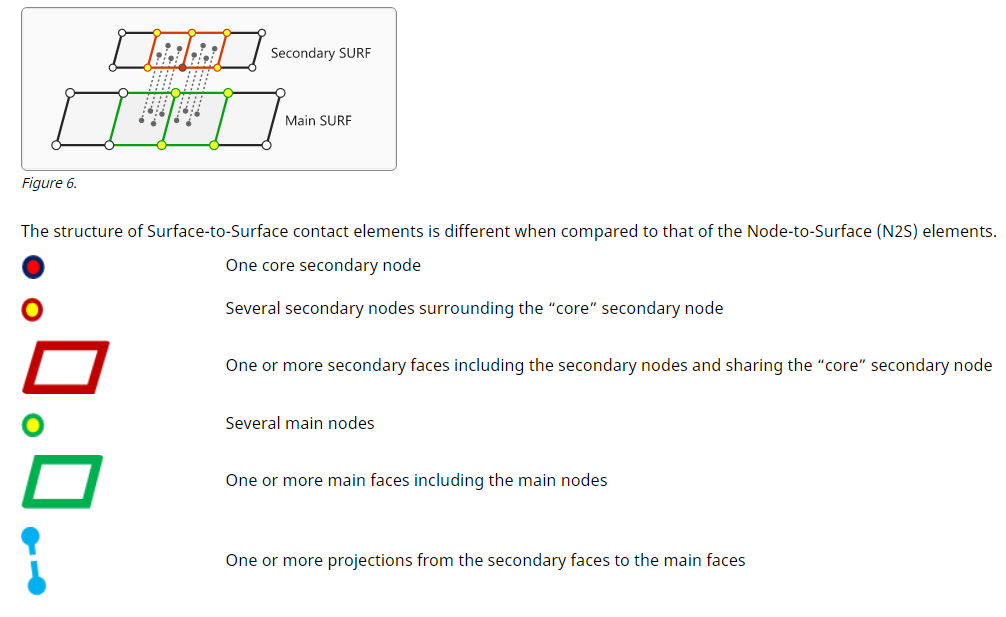
Surface to Surface is related to the discretization of the contact pairs. Is could be Node to Surface, a little bit simpler, where each slave node finds a master surface to create the contact. Surface to Surface distributes better the contact pairings creating a connection between both surfaces.
For more details take a look at OptiStruct help documentation:
https://community.altair.com/community?id=community_blog&sys_id=538764ab1b3790d4a5f742eddc4bcba4
Hi Rita, these are more related to the solver that you are using, in this case OptiStruct. Clearance allows the user to pre-define the clearance/gap in a contact independently of the actual node distance. This can be used when the mesh is not so good, and you want to define a pre-defined gap (even negative for interference/press-fit). Surface to Surface is related to the discretization of the contact pairs. Is could be Node to Surface, a little bit simpler, where each slave node finds a master surface to create the contact. Surface to Surface distributes better the contact pairings creating a connection between both surfaces. For more details take a look at OptiStruct help documentation: https://community.altair.com/community?id=community_blog&sys_id=538764ab1b3790d4a5f742eddc4bcba4
Hi Adriano, thank you so much for your help.
Join us for a community conversation on how High-Performance Computing (HPC) and Simcenter PSIM work together to meet the increasing demands of modern power electronics simulation. During this one-hour technical session, you'll discover how leveraging HPC can speed up simulations, improve scalability, and empower engineers…
Join us for a community conversation on accelerating your motor simulation workflow with Simcenter Simlab. In this beginner-friendly session, we'll introduce the platform's automated model-building capabilities and show how easy it is to set up your first electric motor analysis. You'll see the basic steps of geometry…
Join us for a Community Conversation where we'll discuss practical approaches to analyzing complex electromagnetic models using hybrid solver techniques. This session will provide a general overview of how different computational methods can be combined within a single simulation to address models containing varied…