The Siemens Community Catalyst program was co-created with our community to acknowledge technology leaders who consistently contribute to the Siemens Community. Nominations are accepted on a rolling basis.
Hi,
I want to deactivate/activate an element group using sensors.
How to create the /ACTIV card to call upon the element group
Also Please do share me tutorials on sensors ADD, NOT, OR, RWALL, INTER
Hello Karthic,
/ACTIV can be used to deactivate/activate an element group using sensors.All elements belonging to specified groups are deactivated when the sensor is activated. User has to create a sensor for the same and the same has to be recalled in this card and the element group to deactivated has to be also recalled in the same card. You can find the card in Tools> Create Cards-->Control Cards-->ACTIV
Unfortunately, we dont have any example files for the same.
Please go through Example 12 - Jumping Bicycle in Help Menu which shows simulation of a sequence of events managed using 'sensors'. The model file is attached for your reference.
Unable to find an attachment - read this blog
HI George,
I too have the same help example but i can not find where the sensors are called or used.
Hi Karthic,
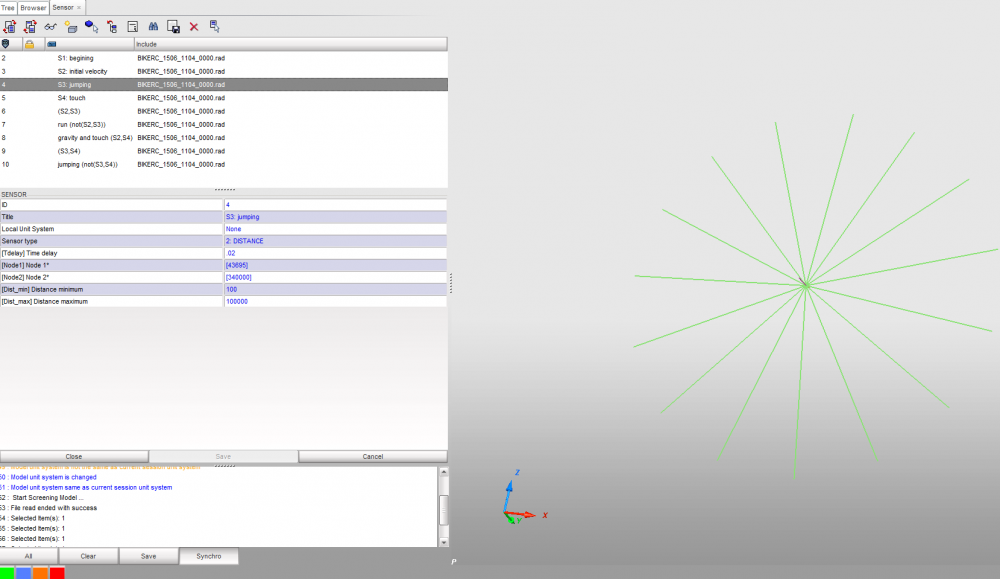
Review the file in HyperCrash and from RADIOSS Tools> select Sensors and review each sensor.
I am attaching a simple spring model with a distance sensor and /ACTIV card.
Please review the engine out file where you can see the element deactivation as soon as sensor is activated.
Thank you George
I reviewed the same in Hyper-crash, But I can not find the information for which collector the sensor is used in ??
<?xml version="1.0" encoding="UTF-8"?>
Join us for a community conversation on how High-Performance Computing (HPC) and Simcenter PSIM work together to meet the increasing demands of modern power electronics simulation. During this one-hour technical session, you'll discover how leveraging HPC can speed up simulations, improve scalability, and empower engineers…
Join us for a community conversation on accelerating your motor simulation workflow with Simcenter Simlab. In this beginner-friendly session, we'll introduce the platform's automated model-building capabilities and show how easy it is to set up your first electric motor analysis. You'll see the basic steps of geometry…
Join us for a Community Conversation where we'll discuss practical approaches to analyzing complex electromagnetic models using hybrid solver techniques. This session will provide a general overview of how different computational methods can be combined within a single simulation to address models containing varied…