The Siemens Community Catalyst program was co-created with our community to acknowledge technology leaders who consistently contribute to the Siemens Community. Nominations are accepted on a rolling basis.
Hi all,
One of good point in SL 2019.3 is it does not freeze during run job.
However, OUTPUT WINDOWS will not print out OUT FILE Running information.
May I know to print out this? Or we need to open run folder than manually open *.out file to check.
Hello Alpha,
The printing of *.out file in output window is removed on solving using solution browser.
When solved using solution bowser we run OptiStruct in background without freezing SimLab. So you could possibly submit more than one OptiStruct jobs at the same time. So it will not be possible to show the logs in the output window.
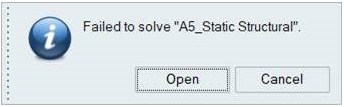
Currently in V2019.3 when there is an error in the OptiStruct solution, SimLab provides an option to open the *.out file as shown in below image.
If the job is successful we directly load the results.
We will soon add more options to show the *.out and *.monitor files live in separate window when solving is in progress. So the user can track the solving process.
Thanks and Regards,
Sivasankar.
Thanks Sivasankar for your information. I made a python script to do this easily.
Join us for a Community Conversation where we'll discuss practical approaches to analyzing complex electromagnetic models using hybrid solver techniques. This session will provide a general overview of how different computational methods can be combined within a single simulation to address models containing varied…
Join us for a community conversation to explore how different modeling approaches in Simcenter PSIM can help engineers simulate power electronics systems while balancing accuracy, simulation speed, and design insight. What you'll learn: Power transistor modeling : Thermal and high fidelity models Protection component…