The Siemens Community Catalyst program was co-created with our community to acknowledge technology leaders who consistently contribute to the Siemens Community. Nominations are accepted on a rolling basis.
Hi,I have a question,
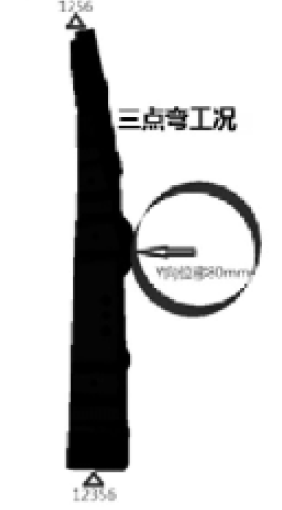
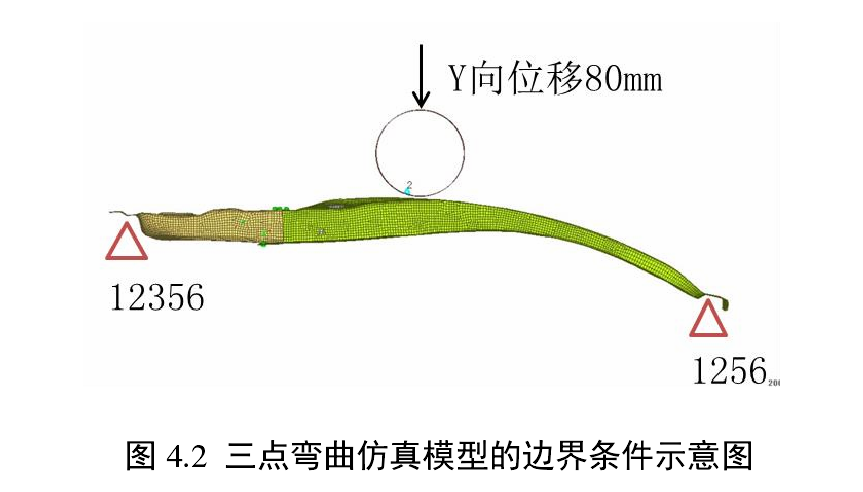
In Optistruct, how to apply a displacement load on a cylindrical rigid wall to simulate a three-point bending test like following picture?
Thanks in advance。
<?xml version="1.0" encoding="UTF-8"?>
You can refer attached OptiStruct example. For enforced displacement you can use SPCD card.
Unable to find an attachment - read this blog
Rahul R
I use SPCD card for a simple example,but it doesn't work, I am puzzled why?
In loadstep subcase section , you checked IC condition as SPCD. Its not needed for static run. Just deactivate and run again.
I am so sorry I don't express it clearly,I want to apply a uniform displacement=80mm to the rigid cylinder in the Y—axis direction winthin 0.2s,like this
but I don't know how to make it by Optistruct?
Hi @Amasker
the B-pillar three-point bend problem would require non-linear quasistatic or dynamic analysis due to three major nonlinearities:
-large displacements/rotations/deformations
-material yielding
-contacts
In dynamic analysis, inertial effects and momentum are included (loading in 0.2s) while quasistatic simulates very slow movement.
Please go through free eBook: Introduction to Nonlinear Finite Element Analysis using OptiStruct
The following videos should help:
Learning Video: RADIOSS - Altair HyperWorks Insider
OptiStruct Nonlinear Learning Center
Try to replicate in your model the analysis setup from the example shared by @Rahul R
Thank you@Ivan,
There is still a problem here in the example shared by @Rahul R,In Optistruct, how to set a cylinder created by myself as a rigid body and apply speed, I want to extract the contact force generated during the collision, and the rigid wall inside Optistruct cannot extract the contact force.
Or in an explicit nonlinear dynamics analysis, can RW in load steps use other geometry as a rigid wall?
I did a simple example,but there is no contact force in .h3d file,can you check it?thanks in advance
following is.fem file
In your shared deck, you have loadstep set to linear static analysis. CONTF will not work for linear cases.
Please refer OptiStruct nonlinear eBook for more information using below link.
https://altairuniversity.com/free-ebook-introduction-to-nonlinear-finite-element-analysis-using-optistruct/
In Optistruct, how to set a cylinder created by myself as a rigid body and apply speed, I want to extract the contact force generated during the collision, and the rigid wall inside Optistruct cannot extract the contact force. 2
In Optistruct, how to set a cylinder created by myself as a rigid body and apply speed, I want to extract the contact force generated during the collision, and the rigid wall inside Optistruct cannot extract the contact force.
Create rigid body using 1D>rigids. Boundary conditions are applied on the master/independent node. Output requests like displacements, forces,... can be requested by Analysis>output block.
It‘s very grateful,your suggestion is helpful, IvanRahul R
There is still a small problem here, which makes me very confused. I originally applied a forced displacement of 80mm in the direction of the dof2 y axis, but the analysis result is that the rigid body has a large displacement along the x-axis direction. I don’t understand what went wrong. here is .fem file , can you give me some suggestion?
And how to extract the value of specific energy absorption instead of cloud image?
Create a rigid body on impactor cylinder and then constrain its independent/master node in all DOF and apply the SPCD on the same node.
Attached is the edited model. Check the modifications and compare to 3pt bend example. The analysis takes a lot of iterations to converge so perhaps there is a more efficient analysis setup.
ESE in the global output request will output strain energy and strain energy density.
Join us for a community conversation on how High-Performance Computing (HPC) and Simcenter PSIM work together to meet the increasing demands of modern power electronics simulation. During this one-hour technical session, you'll discover how leveraging HPC can speed up simulations, improve scalability, and empower engineers…
Join us for a community conversation on accelerating your motor simulation workflow with Simcenter Simlab. In this beginner-friendly session, we'll introduce the platform's automated model-building capabilities and show how easy it is to set up your first electric motor analysis. You'll see the basic steps of geometry…
Join us for a Community Conversation where we'll discuss practical approaches to analyzing complex electromagnetic models using hybrid solver techniques. This session will provide a general overview of how different computational methods can be combined within a single simulation to address models containing varied…