The Siemens Community Catalyst program was co-created with our community to acknowledge technology leaders who consistently contribute to the Siemens Community. Nominations are accepted on a rolling basis.
Hallo,
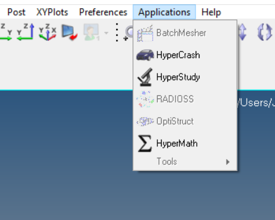
ich habe gerade Hyperworks 14 installiert und meine ertsen Schritte versucht, leider konnte ich die Aplication Optistruct nicht auswählen. Können Sie mir weiterhelfen ?
<?xml version="1.0" encoding="UTF-8"?>
Hi,
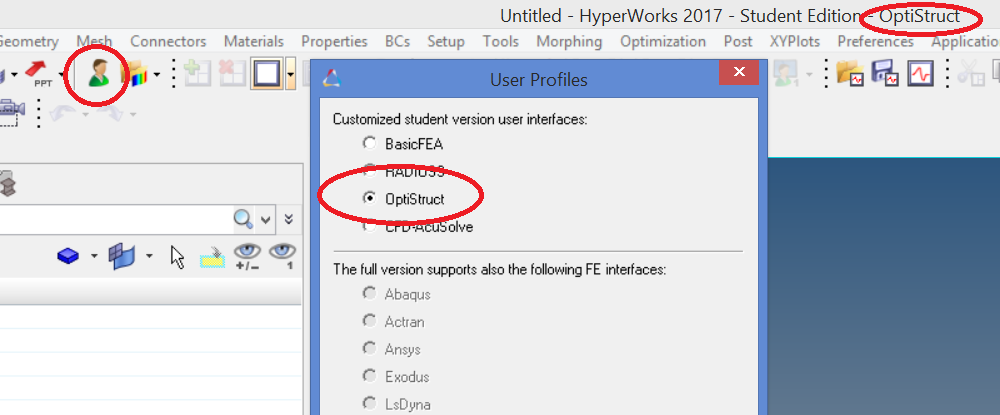
Choose OptiStruct from the user profile, so that the FE solver interface for OptiStruct will be loaded.
The active user profile will be displayed in the top of the HyperMesh window.
thanks for your qick answer.
I did this steps but it´s still gray and i cant´t choose it
Once the user profile is selected as OptiStruct, the HyperMesh interface is loaded for the same. The active user profile will be displayed in the top of the HyperMesh window.
We cannot select OptiStruct from Applications menu and so it will be always grey. You can continue working after selecting OptiStruct user profile.
Many video tutorials on OptiStruct are available at https://www.youtube.com/user/HyperWorksUniversity/search?query=optistruct .
A simple tutorial and the model file is also attached for reference.
Unable to find an attachment - read this blog
Join us for a Community Conversation where we'll discuss practical approaches to analyzing complex electromagnetic models using hybrid solver techniques. This session will provide a general overview of how different computational methods can be combined within a single simulation to address models containing varied…
Join us for a community conversation to explore how different modeling approaches in Simcenter PSIM can help engineers simulate power electronics systems while balancing accuracy, simulation speed, and design insight. What you'll learn: Power transistor modeling : Thermal and high fidelity models Protection component…