The Siemens Community Catalyst program was co-created with our community to acknowledge technology leaders who consistently contribute to the Siemens Community. Nominations are accepted on a rolling basis.
How to apply time varying pressure load in radioss ?I wanted to apply a load on a surface which is time varying in nature.For the same i am applying in the form of pressure how to apply and what points need to take care ?
Hi,
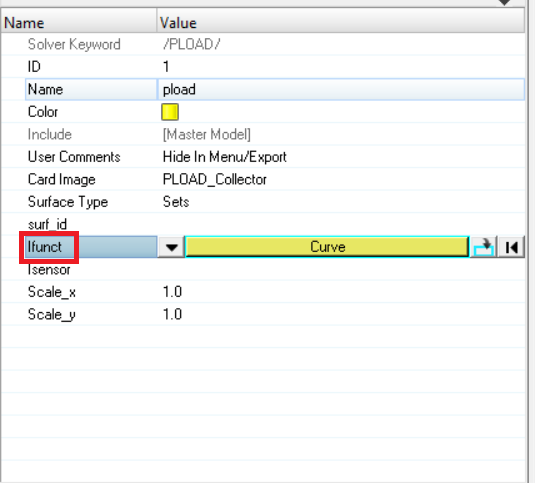
When you apply pressure load in RADIOSS a function needs to be created which is pressure vs time function. And the load will be applied based on this function.
Create a surface set or contact surface and apply /PLOAD on the same.
<?xml version="1.0" encoding="UTF-8"?>
I wanted to apply pressure on a solid element component.
Create a contact surface on the solid component and apply pressure load on the same.
property ?
For the contact surface created there is no need to assign any property. From Analysis>>contactsurfs>>solid faces, select card image as surfseg and select the 3D face for creating the contact surface.
if i wanted to apply a uniform load on a surface in a particular direction then what i need to do ?
You can create a similar curve, that is ramp the load from time 0.
As an example, the curve looks like 0 100
1 100
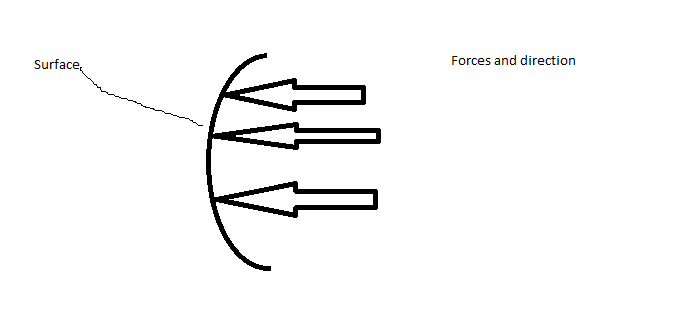
As I can apply conc. load on nodes if I want to apply force uniformly I need to apply pressure load but pressure act perpendicular o surface direction.If I want to apply uniform load on a surface in particular direction?
Pressure load will act only in the normal direction of the elements. We don't have exact options as in CLOAD for PLOAD.
Let us know your exact application so that we can suggest some workarounds.
Something like this. sorry for bad drawing.
For this I think you can try with pressure load, where the load will be applied to the normal of elements.
Is application of pressure is equivalent to application of concentrated load on nodes ?
In case of pressure i care about area and in case of conc. load i care about number of nodes.
I don't think they are equivalent since two elements share one node.
As a workaround you can try this: If you have the pressure value calculate the force (F) from it (F/A) and apply it equally to all the nodes in that surface.I feel that the values will be somewhat closer. You can just try this.
Hello,
I have a pipe which is full of water ( water is modeled by SPH method) I want to apply pressure on the water inside the pipe. I mean I want to apply pressure on SPH particles. What should I do? Since In Hypermesh ( Radioss) I can apply pressure just on contact surface and set surface not on the nodes. Would you please help me and suggest me a way which I can apply pressure on the water?
one of the way which I tried to increase the pressure is , applying temperature to the water but It dose not show any result. Should I have consider special setting when I apply temperature to SHP particles?
I appreciate your help.
Best,
sara
Hi @sara
Not sure what the analysis is about, but if it is a simulation of flow in a pipe I think you can provide pressure using /SPH/INOUT load card.
If not, considering Bernoulli's equation Pressure is inversely proportional to the velocity. So instead of temperature, use velocity and check if that helps.
Hi Prakash,
Thank you so much. but now I have another problem. I have attached a simple model from what I want to explain my problem. I used inlet/ outlet sph to create pressure in the entrance of pipe; however, the interface between pipe (lateral) and water does not work and it depends on Gapmin ( minimum gap).
would you please tell me how should I select the best Gapmin? since when I select .001 there is not any flow in the pipe.
Sara
Unable to find an attachment - read this blog
Sorry for the delay in responding to you
I will check and update you soon.
Can you try with a Gapmin of say 0.05 instead of 1.5?
Hi @sara Can you try with a Gapmin of say 0.05 instead of 1.5?
I tried 0.05 but when I used this there is nothing happen and I do not have any flow.
you can see this in the attached files
Can you try the attached file?
Join us for a community conversation on how High-Performance Computing (HPC) and Simcenter PSIM work together to meet the increasing demands of modern power electronics simulation. During this one-hour technical session, you'll discover how leveraging HPC can speed up simulations, improve scalability, and empower engineers…
Join us for a community conversation on accelerating your motor simulation workflow with Simcenter Simlab. In this beginner-friendly session, we'll introduce the platform's automated model-building capabilities and show how easy it is to set up your first electric motor analysis. You'll see the basic steps of geometry…
Join us for a Community Conversation where we'll discuss practical approaches to analyzing complex electromagnetic models using hybrid solver techniques. This session will provide a general overview of how different computational methods can be combined within a single simulation to address models containing varied…