The Siemens Community Catalyst program was co-created with our community to acknowledge technology leaders who consistently contribute to the Siemens Community. Nominations are accepted on a rolling basis.
Hello,
I want to read rigid wall force in the hypercrash (radioss) how can I read this?
I use FOPT however, it shows zero amount ( I want to get the total rigid wall force)
Best,
sara
Hi Sara,
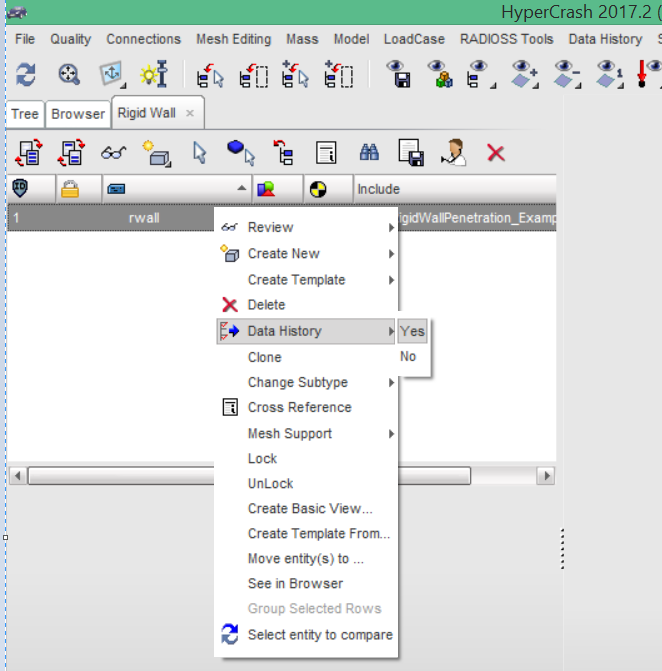
To get the forces for the rigid wall, you need to put it in time history. /TH/RWALL/thgroup_id. To perform the same in HyperCrash, select the rigid wall>>right click and select data history>>yes.
In HyperGraph, select the T01 file from which you can plot the rigid wall forces.
<?xml version="1.0" encoding="UTF-8"?>
Thank you so much George/emoticons/default_smile.png' srcset='/emoticons/smile@2x.png 2x' title=':)' width='20' />.
I really appreciate.
how do i plot the rigid wall force over the rigid wall displacement and not over the time?
Thank you very much!
Tim
Hi,
cross plotting was discussed in:
Abhishek, here is a video which shows on how to plot for Stress Vs Strain in HyperGraph. Similarly you can do the same for Force Vs Displacement. Before that, you need to create output blocks for elements to write stress and strain results to T01 file. Please refer to TH/SHELL for more information. 1
Abhishek,
here is a video which shows on how to plot for Stress Vs Strain in HyperGraph.
Similarly you can do the same for Force Vs Displacement.
Before that, you need to create output blocks for elements to write stress and strain results to T01 file.
Please refer to TH/SHELL for more information.
Unable to find an attachment - read this blog
Hello Ivan,
thank you very much for your answer!
How do i record the displacement of the rigid wall? In the time history options of the rigid wall you can choose the forces as variables only.
Unlike with rigid bodys there is no master node in rigid walls to record the displacemnt separately.
Thank you very much for your help.
I found it out my self. There is a master node in the rigid wall, where you can define a separately time history record of the displacement.
Join us for a community conversation on how High-Performance Computing (HPC) and Simcenter PSIM work together to meet the increasing demands of modern power electronics simulation. During this one-hour technical session, you'll discover how leveraging HPC can speed up simulations, improve scalability, and empower engineers…
Join us for a community conversation on accelerating your motor simulation workflow with Simcenter Simlab. In this beginner-friendly session, we'll introduce the platform's automated model-building capabilities and show how easy it is to set up your first electric motor analysis. You'll see the basic steps of geometry…
Join us for a Community Conversation where we'll discuss practical approaches to analyzing complex electromagnetic models using hybrid solver techniques. This session will provide a general overview of how different computational methods can be combined within a single simulation to address models containing varied…