The Siemens Community Catalyst program was co-created with our community to acknowledge technology leaders who consistently contribute to the Siemens Community. Nominations are accepted on a rolling basis.
How to get contact force graph in radioss
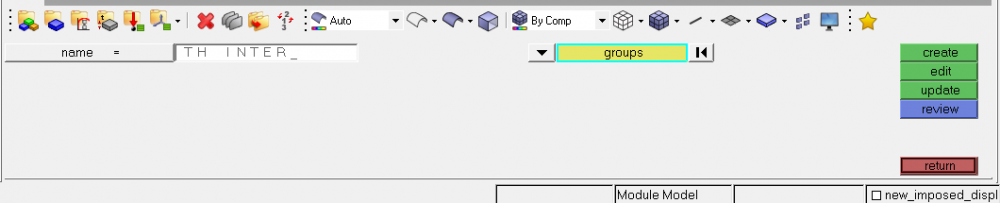
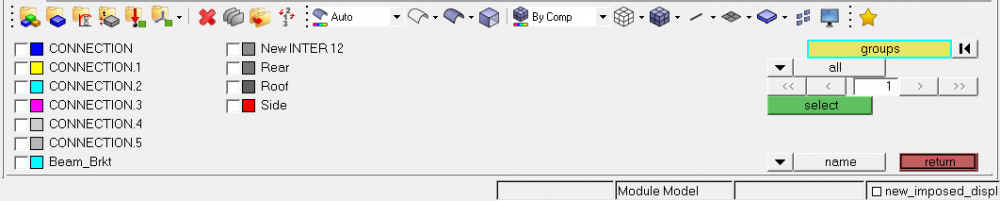
create an output block selecting groups from the menu and select the interfaces from which you want the plots.
once output block is created edit it and input DEF in variable field which will provide all normal and tangential forces in X Y Z direction
sir please to where and how to select the interface,sir please its urgent
Go to Analysis tab>> Output Block>>Give a name and select group from the drop down menu>> click the group and select the interface.
see attached images
<?xml version="1.0" encoding="UTF-8"?>
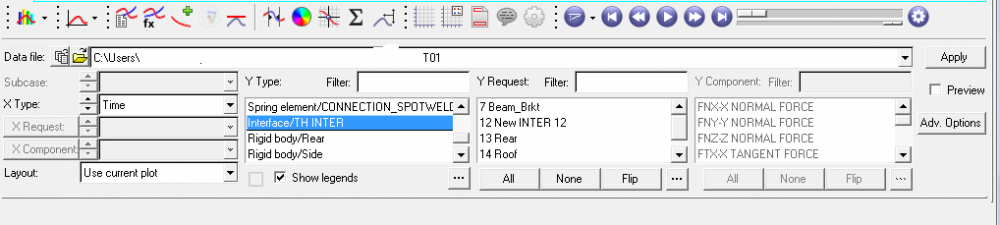
thank you sir, sir i more thing how do i see that graph in hypergraph
upload the T01 file in HyperGraph. and find the attached image for further steps
thank you sir
I have a question.
What is the difference from the contact force in hyperview and in hypergraph?
In hyperview we have the contact force in all points of a shell but in hyper graph 2D we only have one value.
Is the value in hyper graph 2D the sum of all in hyperview?
Thank you
Hi,
In HyperView the contact forces are extracted for the whole model whereas in HyperGraph we are separately extracting the contact forces from the interfaces defined.
Hi
So is it the sum of all stress x area in the interfaces?
The relation for contact force depends on the magnitude of mass of the body and the sudden change in velocity of the body, which is acceleration. If the system of objects is not accelerating, then the contact force between the bodies is just the initial force. There are many open web resources available on calculating contact forces and I request you to go through those for better understanding of this concept.
Join us for a community conversation on how High-Performance Computing (HPC) and Simcenter PSIM work together to meet the increasing demands of modern power electronics simulation. During this one-hour technical session, you'll discover how leveraging HPC can speed up simulations, improve scalability, and empower engineers…
Join us for a community conversation on accelerating your motor simulation workflow with Simcenter Simlab. In this beginner-friendly session, we'll introduce the platform's automated model-building capabilities and show how easy it is to set up your first electric motor analysis. You'll see the basic steps of geometry…
Join us for a Community Conversation where we'll discuss practical approaches to analyzing complex electromagnetic models using hybrid solver techniques. This session will provide a general overview of how different computational methods can be combined within a single simulation to address models containing varied…