The Siemens Community Catalyst program was co-created with our community to acknowledge technology leaders who consistently contribute to the Siemens Community. Nominations are accepted on a rolling basis.
Hello Sir,
I just had changed the stress-strain curve for the material but after that change it shows me the error 156 error in read function. what should i do?
Hi Chirag,
Ensure the curve is recalled in the material card. Also check the curve values.
If the issue persist please share the model file so that we can review.
I have assigned the curve for the crca steel and the error 156 occurs. I have ensure that the curve is recalled in the material card. the values that i had entered for the curve are obtained form the testing in the lab. when I had update the curve is shows the proper curve that i required but the error occurred. Before the curve change i had the results for previous material but somehow we decided to changed to change the material due to availability. I had required the fx curve for the model. Is there is something wrong in curve? where am i do it in wrong way?please help
Thank you for your precious help..
Unable to find an attachment - read this blog
The error is because of the function 4 (crca). In function 4 the strain (x coordiate) values are repeated (The last two X coordinate values are 26.1) which is not allowed for a stress-strain curve and hence it shows the error. I slightly modified the curve and it runs fine.
File is attached along for your reference.
Thank you.
There is termination with warning during running...
What warnings you are getting, share the engine out file (_0001.out) file.
Meanwhile try running with the attached file.
Thank You sir...
Hello sir,
Could you explain me what wrong thing i have did ? What should i do to make it better?
Hello Sir
I had changed the curve named crca assigned to the material ss which is the material of thin-walled component but i had a problem while getting the solution. the time remaining for the solution is continuously increasing. Previously the i had obtain the results which i wanted but the curve raises problem for me. I didn't know what to? I have problem on this part again and again. what should I do?
Thank you for your prestigious help again...
Hi,
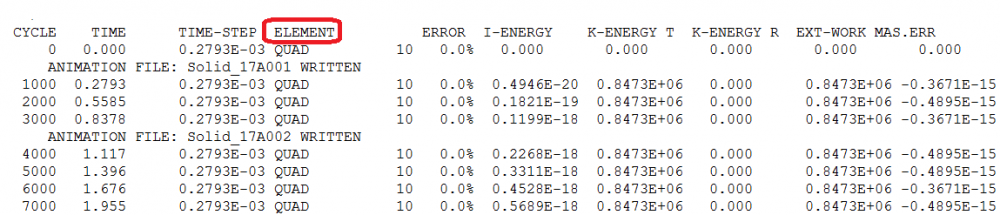
Due to the drop in time step the run time is increasing.
From the engine out files check what is causing this issue. It could be an element, or node or interface.
<?xml version="1.0" encoding="UTF-8"?>
For an element, check the related material.There must not be an error in the units system that this data is given in. check the element size also.
For a node, check the characteristics of connected elements. If the node is on the master side or the slave side of an interface, this interface must be verified.
For an interface, the gap of the interface must be verified if some failure happens on the master or the slave side of the interface. Also check the interface for any penetrations.
Please try running with the attached model file.
Please could you send me that same file which could be able to open in version 14. the file that you have send is not running in my hypermesh. I have hypermesh version 14.
please sir could you send me file again..
Please find the file which is compatible with 14 version.
I have problem again, I am working on the new model but i have problem that i could not able to find out the fx curve. the curve that i had got is only straight line.
please help me again....
i could not able to find out the fx curve. the curve that i had got is only straight line.
Can you please elaborate on this issue you are facing now.
Join us for a community conversation on how High-Performance Computing (HPC) and Simcenter PSIM work together to meet the increasing demands of modern power electronics simulation. During this one-hour technical session, you'll discover how leveraging HPC can speed up simulations, improve scalability, and empower engineers…
Join us for a community conversation on accelerating your motor simulation workflow with Simcenter Simlab. In this beginner-friendly session, we'll introduce the platform's automated model-building capabilities and show how easy it is to set up your first electric motor analysis. You'll see the basic steps of geometry…
Join us for a Community Conversation where we'll discuss practical approaches to analyzing complex electromagnetic models using hybrid solver techniques. This session will provide a general overview of how different computational methods can be combined within a single simulation to address models containing varied…