The Siemens Community Catalyst program was co-created with our community to acknowledge technology leaders who consistently contribute to the Siemens Community. Nominations are accepted on a rolling basis.
Hello,
I must have done an error but when I start my calculation, no file type 0001.rad is written. Do you know how to solve this ? Is it possible to restart a calculation (to simulate more time) without this file ?
Thank you,
Regards
Guillaume
Hi Guillaume,
In order to restart a run you should have a second engine file.
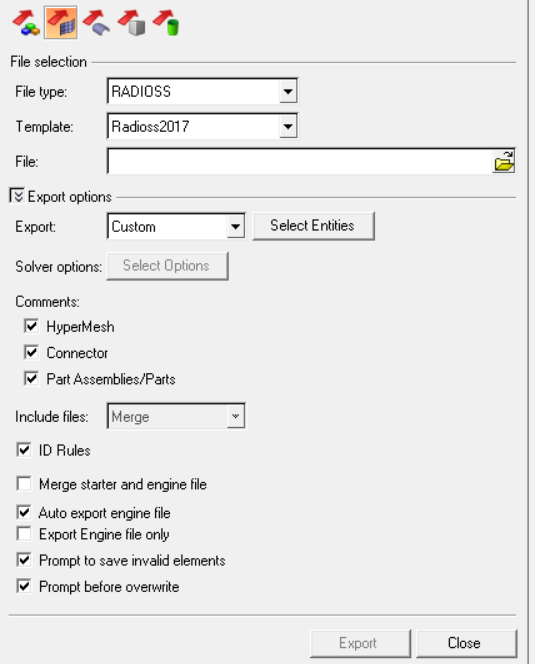
Ensure that while exporting model file Auto export engine file option is checked
<?xml version="1.0" encoding="UTF-8"?>
Hi,
Thank you for your reply !
The 'auto export engine file' was checked, but I may have also checked 'Merge starter and engine file', is that the reason why I do not have any 0001.rad ?
Is it still possible to rerun my calculation ? Or do I have to start it again from the beginning ?
Thanks a lot for your help,
Regards,
Since you have checked 'Merge starter and engine file' option, the engine control cards defined will be in the starter file (_0000.rad) itself and that's why engine file was not created separately. Open the _0000.rad file in Textpad or Notepad and ensure that engine control cards are present.
If the control cards are present in the starter file you can run the same.
Do I have to rename it like I would have if I had the 0001.rad ? Do I have something to do before clicking 'Run' ?
I mean, if I juste run the 0000.rad again, it will erase my calculation and do it again, won't it ?
Finally, how do I set the time I want to rerun the calulation for ?
Sorry for all these questions but I am a beginner and I didn't find these answers on the documentation I have about Radioss.
There is no need to rename, since both the starter and engine files are merged. You can directly run the file.
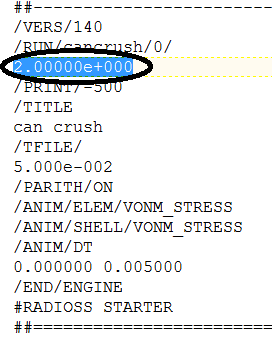
To provide the run time, either open the _0000.rad file Textpad or Notepad and manually change the run time under /RUN. Please see the attached image.
Else import the file in HyperMesh, change the run time and export again.
Since you are a beginner I recommend you to practice a crash box tutorial which is available at https://altairuniversity.com/wp-content/uploads/2016/11/Crash_Box_1.pdf
Also, you can get exposed to various analyses using Altair tools at https://altairuniversity.com/conceptual-design-of-a-3-wheeler-motorbike/
Thanks a lot !
Join us for a community conversation on how High-Performance Computing (HPC) and Simcenter PSIM work together to meet the increasing demands of modern power electronics simulation. During this one-hour technical session, you'll discover how leveraging HPC can speed up simulations, improve scalability, and empower engineers…
Join us for a community conversation on accelerating your motor simulation workflow with Simcenter Simlab. In this beginner-friendly session, we'll introduce the platform's automated model-building capabilities and show how easy it is to set up your first electric motor analysis. You'll see the basic steps of geometry…
Join us for a Community Conversation where we'll discuss practical approaches to analyzing complex electromagnetic models using hybrid solver techniques. This session will provide a general overview of how different computational methods can be combined within a single simulation to address models containing varied…