Hello,
I am a HyperMesh user who recently migrated from HyperMesh 2021 to HyperMesh 2025.
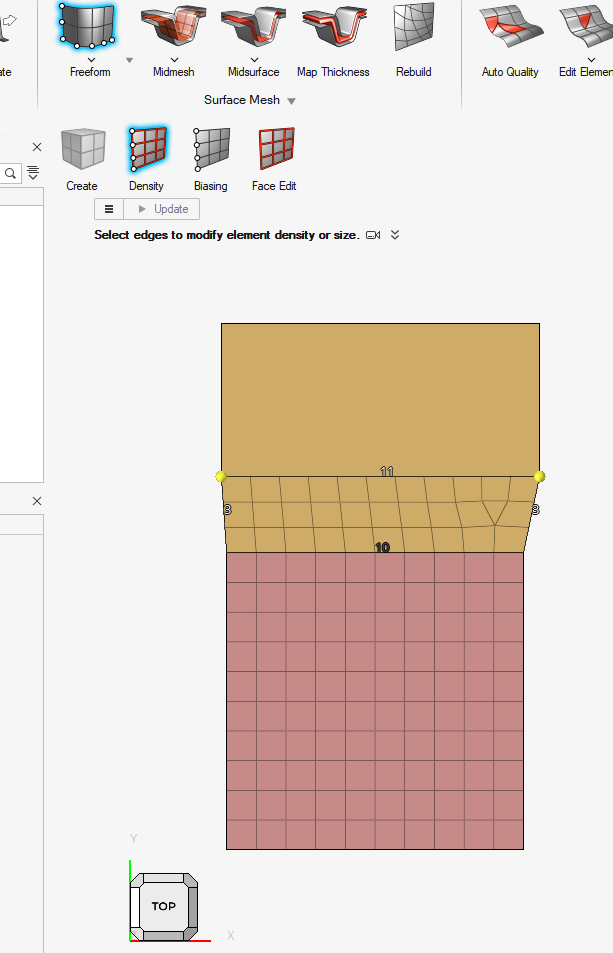
In HyperMesh 2021 Classic, I frequently used the 2D → Ruled function with a Node-to-Line workflow to create a strip of shell elements between an existing boundary node list and an offset line.
This workflow was very useful because:
- Existing boundary nodes were preserved.
- Node sharing with adjacent layers was maintained.
- No remeshing of the existing model was required.
- It worked well for complex boundaries where simple extrusion was not practical.
I am trying to find the equivalent workflow in HyperMesh 2025.
So far I have:
- Enabled FE Geometry mode in Preferences.
- Opened Ruled Linear and selected the FE option.
- Verified that Node-to-Node ruled mesh creation is available.
- However, I cannot find a Node-to-Line option.
- I also tested Extrude, but it creates a separate mesh with new nodes and does not preserve node sharing with the existing mesh.
My use case is:
- Existing shell mesh already shares nodes with multiple adjacent layers.
- I need to extend the mesh outward and create a strip of elements while preserving the existing boundary nodes.
- Rebuilding geometry and remeshing is not a practical solution because it would break existing node-sharing relationships.
Could you please advise:
- What is the recommended HyperMesh 2025 workflow that replaces the HyperMesh 2021 Node-to-Line Ruled functionality?
- Is the Node-to-Line Ruled capability still available in HyperMesh 2025?
- If it has been replaced, what is the recommended method for creating a connected strip mesh while preserving existing boundary nodes and node-sharing relationships?
Thank you for your help.
Best regards,