The Siemens Community Catalyst program was co-created with our community to acknowledge technology leaders who consistently contribute to the Siemens Community. Nominations are accepted on a rolling basis.
I used to used the auto pretension section in Hypermesh 2020 to automatically create my Pre-Tension section, the load and the Fixed BC. I am unable to locate the auto pretension section manager. where did the contact manger move to?
I'm talking about this: https://2020.help.altair.com/2020/hwdesktop/hm/topics/user_interface/utility_menu_abaqus_pre_tension_section_r.htm?zoom_highlightsub=pretension
Hi,
As we can see from the link you have given, you are talking about Abaqus user interface.
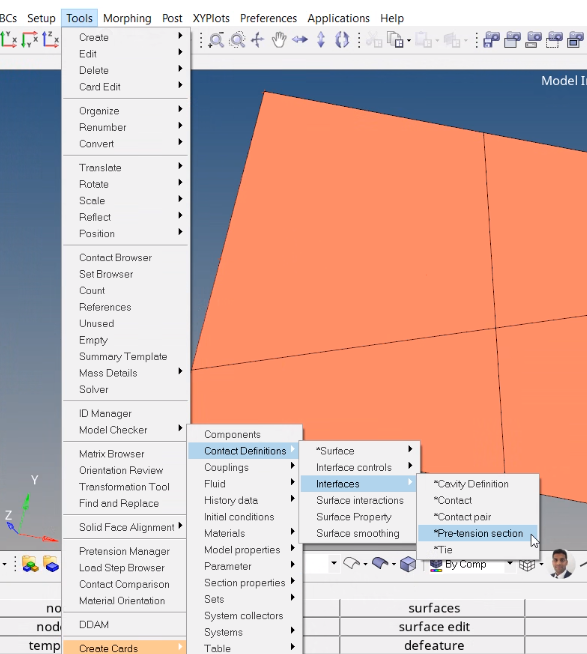
So, in Abaqus user interface, click on utility >>> tools >>> contact manager. Here, you can access pre-tension section in Interface tab.
You can access the Pre-Tension section in the following way in 2020 version of HyperMesh - Abaqus user profile
This needs to me create the surface manually. In the previous versions, there used to be the option to automatically create both the pretension surface and the pretension node using the auto command in the contact manager. I am looking for that option. It saves a lot of time.
Join us for a Community Conversation where we'll discuss practical approaches to analyzing complex electromagnetic models using hybrid solver techniques. This session will provide a general overview of how different computational methods can be combined within a single simulation to address models containing varied…
Join us for a community conversation to explore how different modeling approaches in Simcenter PSIM can help engineers simulate power electronics systems while balancing accuracy, simulation speed, and design insight. What you'll learn: Power transistor modeling : Thermal and high fidelity models Protection component…