The Siemens Community Catalyst program was co-created with our community to acknowledge technology leaders who consistently contribute to the Siemens Community. Nominations are accepted on a rolling basis.
While solving, in Optistruct, the following error is being encountered and the solution stops.
Error 1789 - Volume elements share common face.
What is the first step in troubleshooting this error?
Hi Karth,
Ca you please share more details about the error and what kind of analysis you were performing. Also please can you share your model file.
Please, use below FT link to share your model.
https://ftin.india.altair.com:8443/filedrop/~osKE8Q
Thank you
Hi Premanand,
Thanks for the post.
Shared the file with details.
Hi karth,
I saw your model. You haven't created the contacts, you have only created the groups. Please create the contacts first and then create groups. Please check this video, where i have shown how to create contact.
Unable to find an attachment - read this blog
I suppose, the video explains the manual contact creation procedure.
I just followed the procedure for creating autocontacts.
'Tools - contact browser - selected the components - right click and create autocontacts.'
Also, it prompted--no. of auto contacts were created!
There are sets and groups created and available in the model after this step. So, may I know how are you asserting that the contacts were not created?
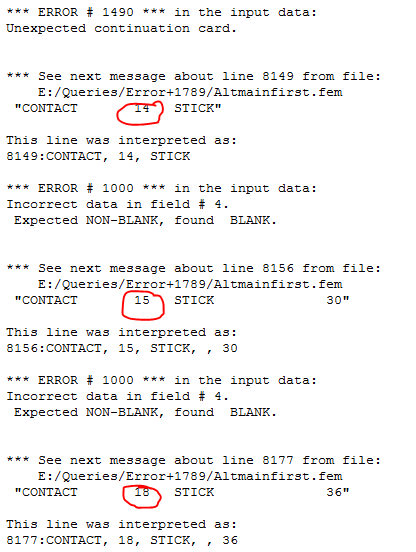
I'm really sorry, i didn't check your model properly. That was really unprofessional. Actually, you haven't defined slave ID's for certain groups (Highlighted in below image). That is what the error is showing. Please make sure you have created Master and Slave ID's for all the groups.
Also, since you are using stick contact, please use NLSTAT in subcase and define bulk data NLPARM.
Never mind.
1) How to identify this kind of an error such as slave id's were not defined. Which part of your snapshot hints that point?
2) While I work with auto-contacts that automatically creates set of master and slave elements, how come slave id's are missed?
3) Incorrect data in field 4 --> What is field 4 and where to see it in the model tree?
4) Since, modal simulation considers all non-linear contacts as linear, I switched the contact option from stick to freeze. While solving, I now obtain a new error ---> '*** ERROR # 1789 *** Volume elements 4601519 869786 869849 share common face *** Run terminated because of error(s) in the input data.'. Any idea of how to troubleshoot this?
Thanks.
It will not specify that slave id is missing, but it says something is missing in this id. It all based on your experience, you''ll be able to read the errors. We read output file and analyze what is going wrong.
There might be some duplicates elements formed while meshing, which causes these type of problem. Tool will not be able to create proper connections.
4) Since, modal simulation considers all non-linear contacts as linear, I switched the contact option from stick to freeze. While solving, I now obtain a new error ---> '*** ERROR # 1789 ***
this error is caused because, while creating auto-contacts you have used sets, instead use surfaces and create contacts.
Also make sure that all the elements are solid elements and there are no shell elements in your model.
thank you
Join us for a community conversation on how High-Performance Computing (HPC) and Simcenter PSIM work together to meet the increasing demands of modern power electronics simulation. During this one-hour technical session, you'll discover how leveraging HPC can speed up simulations, improve scalability, and empower engineers…
Join us for a community conversation on accelerating your motor simulation workflow with Simcenter Simlab. In this beginner-friendly session, we'll introduce the platform's automated model-building capabilities and show how easy it is to set up your first electric motor analysis. You'll see the basic steps of geometry…
Join us for a Community Conversation where we'll discuss practical approaches to analyzing complex electromagnetic models using hybrid solver techniques. This session will provide a general overview of how different computational methods can be combined within a single simulation to address models containing varied…