The Siemens Community Catalyst program was co-created with our community to acknowledge technology leaders who consistently contribute to the Siemens Community. Nominations are accepted on a rolling basis.
Hi all,
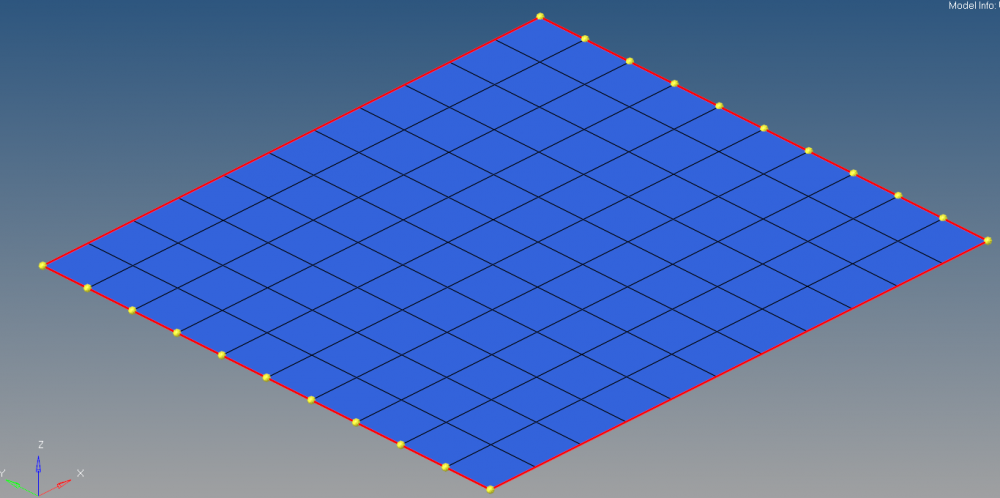
How to get nodes from free edges and drag it in particular direction using tcl?
Regards,
Sanket
use *createmark nodes 'by comp name' ^edges
for dragging, use panel 2d>drag to try, and you can find relevant commands in command.tcl file
@tinhThanks for quick reply.
But i want to drag nodes of two edges only as shown below,
<?xml version="1.0" encoding="UTF-8"?>
How to do that?
There is not a direct way.
You have to detect 4 sides of the square and then select 2 opposite sides. I think you are beginner so it is so tough with you.
And you will ask how to detect...
You must compare angle between each pair of edges and record the node as corner if angle is not 180D
And you will ask how to compare angle...
You must make some loops to calculate angles, sort to see which ones not 180D
And you will ask how to make a loop...
/emoticons/default_rolleyes.gif' title=':rolleyes:' />
You should learn hypermesh and basic tcl first. Then write some sample codes, see how it works, divide your work into small tasks, write tcl procs for each task, combine them to form a full program.
And, you should not learn tcl right if you are not good at hypermesh yet. Tcl macro simulates how you act with HM.
@tinhHello Tinh,
Thanks for your valuable suggestions. I will definitely learn Tcl/tk.
I would like to tell you that i can select now required nodes which query i asked you above.
Join us for a community conversation on how High-Performance Computing (HPC) and Simcenter PSIM work together to meet the increasing demands of modern power electronics simulation. During this one-hour technical session, you'll discover how leveraging HPC can speed up simulations, improve scalability, and empower engineers…
Join us for a community conversation on accelerating your motor simulation workflow with Simcenter Simlab. In this beginner-friendly session, we'll introduce the platform's automated model-building capabilities and show how easy it is to set up your first electric motor analysis. You'll see the basic steps of geometry…
Join us for a Community Conversation where we'll discuss practical approaches to analyzing complex electromagnetic models using hybrid solver techniques. This session will provide a general overview of how different computational methods can be combined within a single simulation to address models containing varied…