The Siemens Community Catalyst program was co-created with our community to acknowledge technology leaders who consistently contribute to the Siemens Community. Nominations are accepted on a rolling basis.
Hello everybody
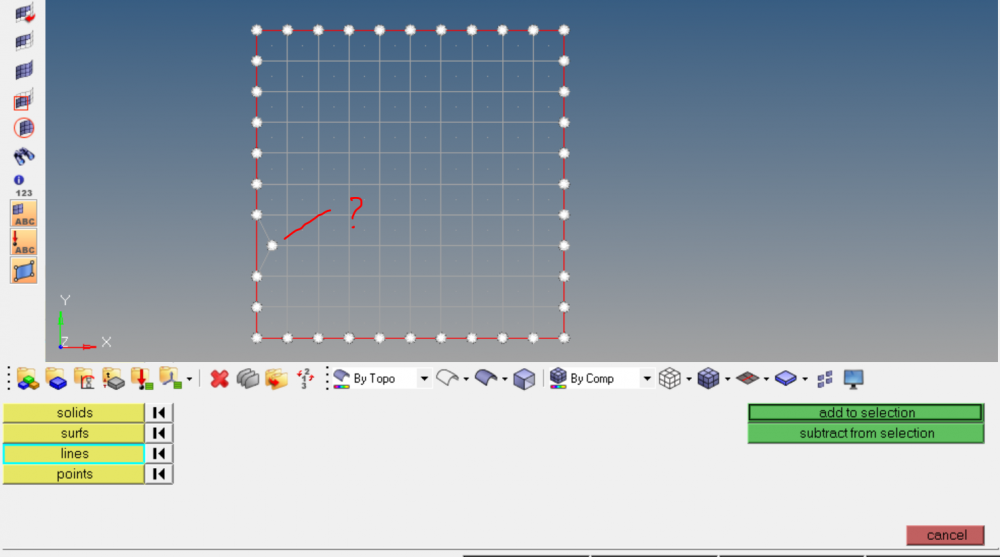
When I select some nodes 'by geom' lines, hypermesh select nodes those not on lines also
Could you please test it in you hypermesh version?
<?xml version="1.0" encoding="UTF-8"?>
Unable to find an attachment - read this blog
No problem with me in HM13. Maybe because of geometrical tolerance?
Thank you sir. perhaps i need some hw updates
The tolerance is default, I just open a blank hypermesh, create a square surface size 100, automesh on it, F7>move node to move an outer node inward (1.0, 2.0mm,..)
but select nodes 'by lines' still include it
also *createmark nodes 1 'by lines' mark it
Ahh, you tried mode node manually with F7 /emoticons/default_smile.png' srcset='/emoticons/smile@2x.png 2x' title=':)' width='20'>
I have same 'problem' with HM13 ! But if you use 'tool' => 'translate' to move the node, you loss association between node & geometry.
So I think the action of 'move node' with F7 keeps always the association. That's not logic for me. Maybe a BUG?
Personnally, I never use F7 functions, ... until today /emoticons/default_biggrin.png' srcset='/emoticons/biggrin@2x.png 2x' title=':D' width='20'>
/emoticons/default_rolleyes.gif' title=':rolleyes:'> yes it may be a bug. I just use F7 when move node on a surface (curve surf), and keep association with the surf
but till now I see it keeps association with line although it should not.
All,
Thank you for letting us know, I will report this to the dev team.
Join us for a community conversation on how High-Performance Computing (HPC) and Simcenter PSIM work together to meet the increasing demands of modern power electronics simulation. During this one-hour technical session, you'll discover how leveraging HPC can speed up simulations, improve scalability, and empower engineers…
Join us for a community conversation on accelerating your motor simulation workflow with Simcenter Simlab. In this beginner-friendly session, we'll introduce the platform's automated model-building capabilities and show how easy it is to set up your first electric motor analysis. You'll see the basic steps of geometry…
Join us for a Community Conversation where we'll discuss practical approaches to analyzing complex electromagnetic models using hybrid solver techniques. This session will provide a general overview of how different computational methods can be combined within a single simulation to address models containing varied…