The Siemens Community Catalyst program was co-created with our community to acknowledge technology leaders who consistently contribute to the Siemens Community. Nominations are accepted on a rolling basis.
Hallo Group
I am doing Frequecy response analysis
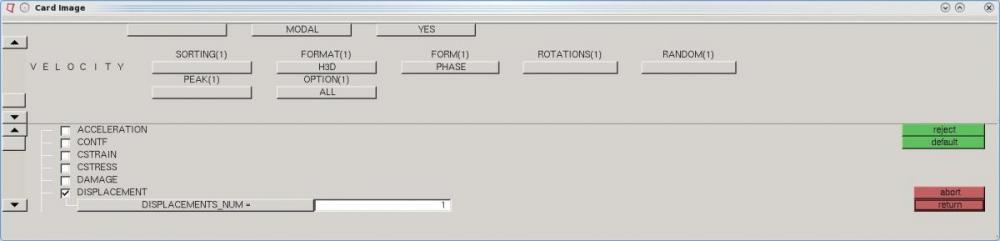
following image ie Gobal output control card
what does the form field indicate eg real , phase, imagnary, both.
Regards
Pratik
<?xml version="1.0" encoding="UTF-8"?>
Hi Pratik,
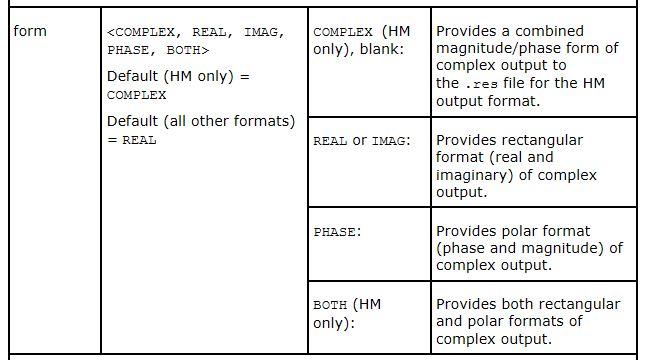
I have attached screenshot of user guide information for form field.Let say if it is set to phase. then after solving it will help you to plot curve between phase angle versus frequency.
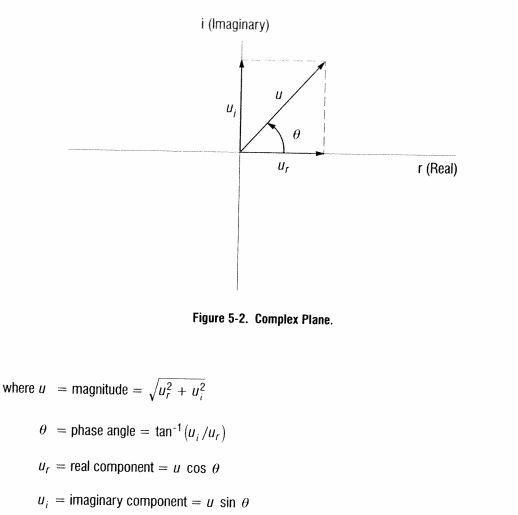
The important results from frequency response analysis usually include the displacement, velocities and acceleration of grid points as well as the forces and stresses of elements.The computed response are complex numbers defined as magnitude and phase (with respect to applied force) or as real and imaginary components,which are vector components of the response in the real/imaginary plane.These quantities are graphically presented.
Rahul R
Hi Rahul
Do you know to get values at (velocity/ Dispalcement) at specific grid point/ nodes with out solving for whole structure for direct frecquency response. I tried using options>set1(set of interested point ) at global output request. and also defining the set of point under output block
Looks like you are looking at wrong parameters.
Instead, Goto Analysis page>> control cards>> Global output request>> Displacement/velocity to output as you have posted in your first post.
output blocks may not help when you are doing a FRA.
In HYpermesh 2019 where I WILL FIND THE GLOBAL CASE CONTROL & GLOBAL OUTPUT REQUEST?
Join us for a community conversation on how High-Performance Computing (HPC) and Simcenter PSIM work together to meet the increasing demands of modern power electronics simulation. During this one-hour technical session, you'll discover how leveraging HPC can speed up simulations, improve scalability, and empower engineers…
Join us for a community conversation on accelerating your motor simulation workflow with Simcenter Simlab. In this beginner-friendly session, we'll introduce the platform's automated model-building capabilities and show how easy it is to set up your first electric motor analysis. You'll see the basic steps of geometry…
Join us for a Community Conversation where we'll discuss practical approaches to analyzing complex electromagnetic models using hybrid solver techniques. This session will provide a general overview of how different computational methods can be combined within a single simulation to address models containing varied…