The Siemens Community Catalyst program was co-created with our community to acknowledge technology leaders who consistently contribute to the Siemens Community. Nominations are accepted on a rolling basis.
hello,
I couldn't get the model file for the day 5 linear analysis tutorial 3. basically the file is present but in fem format, but according to the tutorial its a hm file. So can you please attach the file.
Dear Student,
Before we proceed ahead, you should know -
1. '.HM' is Hyper Mesh database File
2. '.FEM' is OptiStruct Solver deck
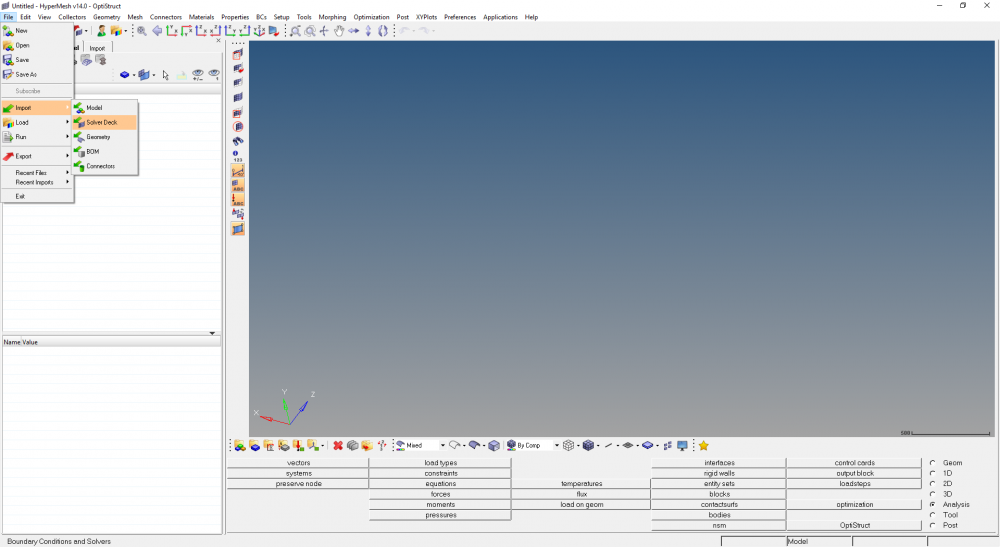
In order to open .FEM File ( OptiStruct Solver Deck ) , you can follow below provided steps -
Go to - File > Import > Solver Deck
<?xml version="1.0" encoding="UTF-8"?>
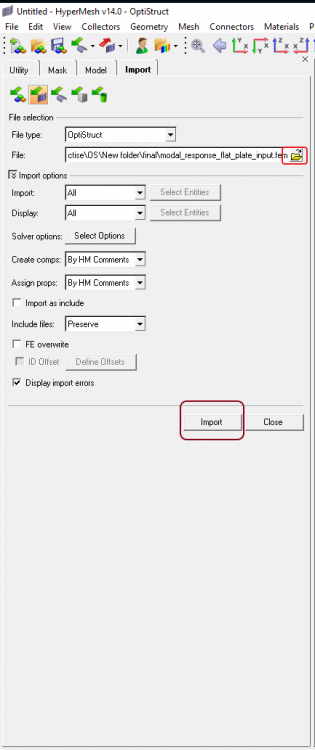
Select the 'Solver Deck Path' & 'Import' as shown in the below image.
PFA Model file for the same.
Unable to find an attachment - read this blog
Join us for a community conversation on how High-Performance Computing (HPC) and Simcenter PSIM work together to meet the increasing demands of modern power electronics simulation. During this one-hour technical session, you'll discover how leveraging HPC can speed up simulations, improve scalability, and empower engineers…
Join us for a community conversation on accelerating your motor simulation workflow with Simcenter Simlab. In this beginner-friendly session, we'll introduce the platform's automated model-building capabilities and show how easy it is to set up your first electric motor analysis. You'll see the basic steps of geometry…
Join us for a Community Conversation where we'll discuss practical approaches to analyzing complex electromagnetic models using hybrid solver techniques. This session will provide a general overview of how different computational methods can be combined within a single simulation to address models containing varied…