The Siemens Community Catalyst program was co-created with our community to acknowledge technology leaders who consistently contribute to the Siemens Community. Nominations are accepted on a rolling basis.
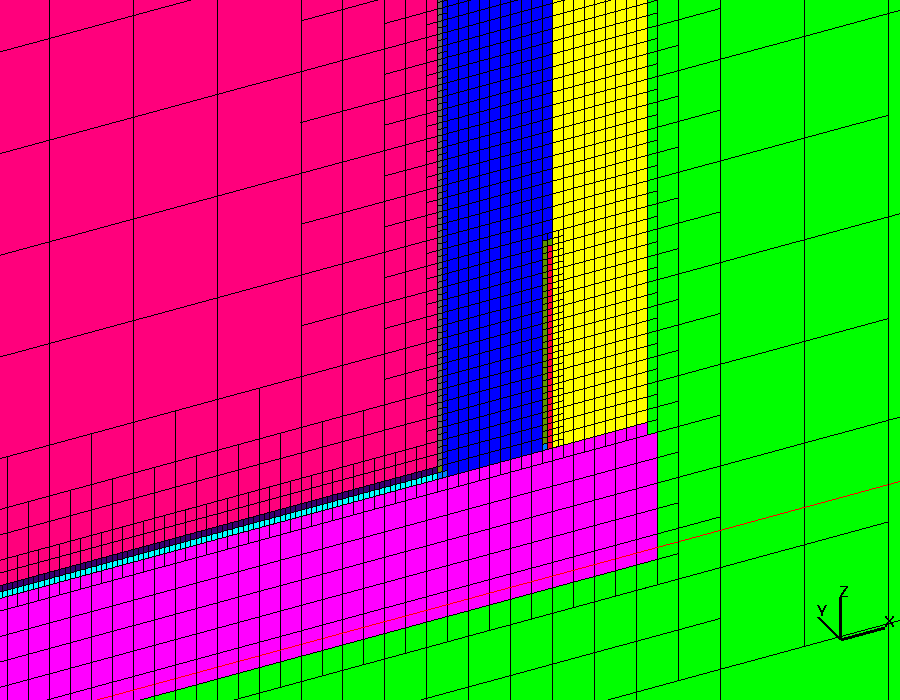
I came across this mesh image in the internet.
Can anyone explain how this is a valid mesh? Won't this result in connectivity issues in the mesh due to hanging nodes?
<?xml version="1.0" encoding="UTF-8"?>
Please check for what type analysis this mesh has been used.I am sure this mesh is not for structural analysis.
@Rahul R, I think it's for CFD.
https://meshing.lanl.gov/proj/ASCEM_Tank/images/gallery.html
Is this type of hanging node OK for CFD?
Yeah, that's CFD's meshing and Hyperworks does not support this kind of meshing.
I'm sure that Numeca can do this mesh.
As mentioned above its a CFD mesh.(Octree hex mesh)
Octree approach is useful when you have a very poor cad and tricky surfaces. Use this approach when you do not want to spend more time cleaning cad model. On the other hand, advancing front requires less user input to generate a good mesh, but it does require good quality CAD surfaces and tricky surfaces sometimes don't mesh. You can refer wiki on how the Octree algorithm works.
http://en.wikipedia.org/wiki/Octree
The Octree based tet meshing introduced in version 13.0 is a faster and high quality alternative to the proven advancing front meshing algorithm, and can be used with more than just CFD applications. And due to the logic behind this scheme it provides a very nice BL transition.
It can be accessed through the 3D page tetramesh or CFD tetramesh panel Tetramesh parameters option. Please refer snapshot below:
@Rahul R: 'Octree based' meshing of Hypermesh CAN'T product CFD mesh as mentionned at screenshot of @SKGPrashanth. Hypermesh's octree based meshing is TET mesh in fact.
Yes i do agree.That was just for information.In above mentioned link it says Octree Hex.
As mentioned above its a CFD mesh.(Octree hex mesh) Octree approach is useful when you have a very poor cad and tricky surfaces. Use this approach when you do not want to spend more time cleaning cad model. On the other hand, advancing front requires less user input to generate a good mesh, but it does require good quality CAD surfaces and tricky surfaces sometimes don't mesh. You can refer wiki on how the Octree algorithm works. http://en.wikipedia.org/wiki/Octree The Octree based tet meshing introduced in version 13.0 is a faster and high quality alternative to the proven advancing front meshing algorithm, and can be used with more than just CFD applications. And due to the logic behind this scheme it provides a very nice BL transition. It can be accessed through the 3D page tetramesh or CFD tetramesh panel Tetramesh parameters option. Please refer snapshot below: <?xml version="1.0" encoding="UTF-8"?>
pls explain the option 'PYRAMID TRANSITION RATO ' in tetramesh parameters panel.
Hi M.karthickraja
Pyramid Transition ratio defines the relative height of pyramid elements used for the transition from hexa elements in the boundary layer to the tetra elements in the core
Thanks
Join us for a community conversation on how High-Performance Computing (HPC) and Simcenter PSIM work together to meet the increasing demands of modern power electronics simulation. During this one-hour technical session, you'll discover how leveraging HPC can speed up simulations, improve scalability, and empower engineers…
Join us for a community conversation on accelerating your motor simulation workflow with Simcenter Simlab. In this beginner-friendly session, we'll introduce the platform's automated model-building capabilities and show how easy it is to set up your first electric motor analysis. You'll see the basic steps of geometry…
Join us for a Community Conversation where we'll discuss practical approaches to analyzing complex electromagnetic models using hybrid solver techniques. This session will provide a general overview of how different computational methods can be combined within a single simulation to address models containing varied…