The Siemens Community Catalyst program was co-created with our community to acknowledge technology leaders who consistently contribute to the Siemens Community. Nominations are accepted on a rolling basis.
I am a beginner for hypermesh customization.
Want to know what are the prerequisites before i enter customization. And how do i set up the environment for customizing Hypermesh.
What kind of customization you are looking for?
Hypermesh customization like developing tools (\GUIs) or writing scripts using TCL/ TK for preprocessing. Another example is if i want to automate meshing on a part family. I need to setup the environment so i can start doing something in HM.
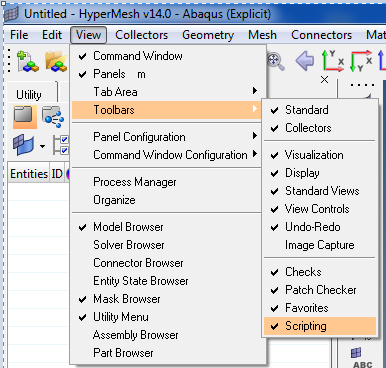
Once you activate this toolbar, you can start writing and running TCL scripts.
<?xml version="1.0" encoding="UTF-8"?>
Toolbar to create and run TCL scripts.
Once you activate this toolbar, you can start writing and running TCL scripts. <?xml version="1.0" encoding="UTF-8"?> Toolbar to create and run TCL scripts. <?xml version="1.0" encoding="UTF-8"?>
But when i write something after using a new TCL file, how to run. which document i should refer for APIs?
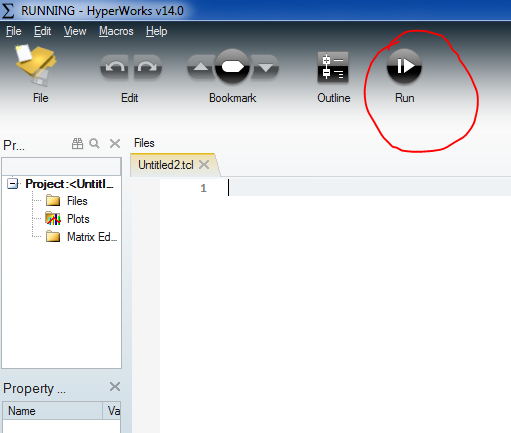
Click the icon shown below in the editor.
Hi Harish,
Clicking on the run button doesn't do anything. Any info?
Hello Divyanshu,
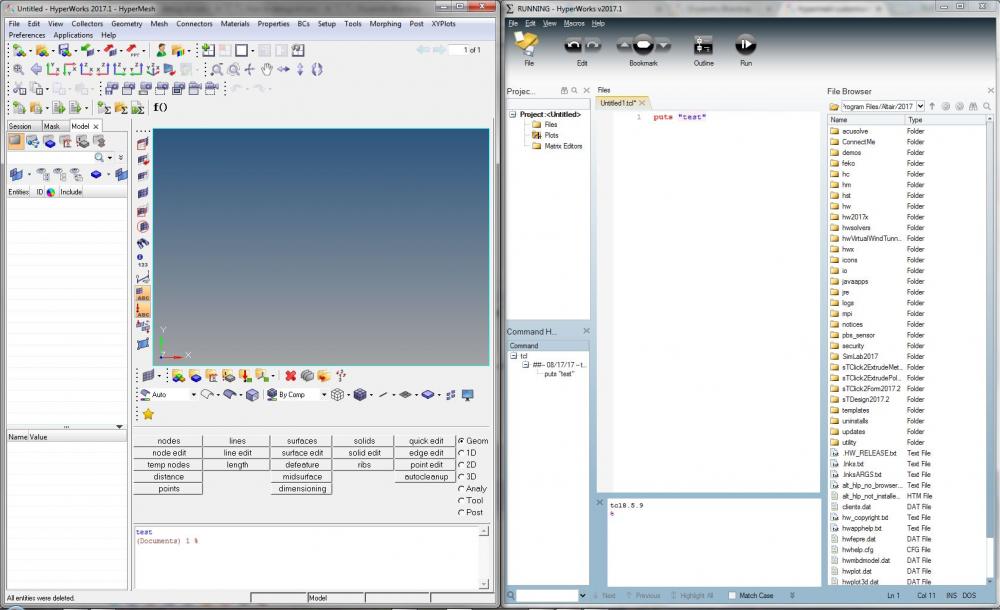
When you press Run, the script gets executed and output gets printed in the HM command Window.
Hello Divyanshu, When you press Run, the script gets executed and output gets printed in the HM command Window. <?xml version="1.0" encoding="UTF-8"?>
Hi livillyle,
Thanks for your response. It's working fine, only if the command written is correct. I want to ask you further, if i've written a piece of code in Hypermath module and if there's any error, it doesn't allow me to debug. It says the file is running, but the cursor is not shown on the breakpoints. Any idea?
Hello Divyanshu ,
I haven't worked much on Hypermath, Kindly check the below tutorials regarding debugging in Hypermath. https://connect.altair.com/CP/kb-view.html?kb=159288https://connect.altair.com/CP/kb-view.html?kb=159307
You can also find these tutorials by pressing F1 from Hypermath.
Hello Divyanshu , I haven't worked much on Hypermath, Kindly check the below tutorials regarding debugging in Hypermath. https://connect.altair.com/CP/kb-view.html?kb=159288https://connect.altair.com/CP/kb-view.html?kb=159307 You can also find these tutorials by pressing F1 from Hypermath.
Hi Livillyle,
I was referring the same tutorial, the problem is i didn't find any such reference file in the installation dir. i am using HM 14.0.
Also, if i make my own test file, and follow the same approach, it doesn't debug if there is anything wrong in the program.
thanks for your reply.
The tutorial files can be found from the below links:
Hm: 13 - https://connect.altair.com/CP/download-file.html?aceig=dkdZW6RLp%2FWB9AMqotvkoTxyxyYqAQqQPOWRj40CcrfcrK4vct8mSCAX3Win9tXGXCWi3KyrP2mW ckZMX5VxhtTK0UUU44ulqTN93i9HWF%2BfBJbUycBYO%2BOYgLIob8ovR1hfnwTklYmG Hm 2017 - https://connect.altair.com/CP/download-file.html?aceig=cUJYXqRLp%2FWB9AMqotvkoTxyxyYqAQqQPOWQjIwBcrfcrK4vct8mSCAX3Win9tXGXCWi0qyrP2mW cUVZWYk87d3pwUcz9Ki1vC9vwiUABFydPOeo%2BcFEIumHta8KdNk3FARcnTznqIuABWc%3D
I have attached the same.
Unable to find an attachment - read this blog
Hello Divyanshu, The tutorial files can be found from the below links: Hm: 13 - https://connect.altair.com/CP/download-file.html?aceig=dkdZW6RLp%2FWB9AMqotvkoTxyxyYqAQqQPOWRj40CcrfcrK4vct8mSCAX3Win9tXGXCWi3KyrP2mW ckZMX5VxhtTK0UUU44ulqTN93i9HWF%2BfBJbUycBYO%2BOYgLIob8ovR1hfnwTklYmG Hm 2017 - https://connect.altair.com/CP/download-file.html?aceig=cUJYXqRLp%2FWB9AMqotvkoTxyxyYqAQqQPOWQjIwBcrfcrK4vct8mSCAX3Win9tXGXCWi0qyrP2mW cUVZWYk87d3pwUcz9Ki1vC9vwiUABFydPOeo%2BcFEIumHta8KdNk3FARcnTznqIuABWc%3D I have attached the same.
Thanks a lot.
Join us for a community conversation on how High-Performance Computing (HPC) and Simcenter PSIM work together to meet the increasing demands of modern power electronics simulation. During this one-hour technical session, you'll discover how leveraging HPC can speed up simulations, improve scalability, and empower engineers…
Join us for a community conversation on accelerating your motor simulation workflow with Simcenter Simlab. In this beginner-friendly session, we'll introduce the platform's automated model-building capabilities and show how easy it is to set up your first electric motor analysis. You'll see the basic steps of geometry…
Join us for a Community Conversation where we'll discuss practical approaches to analyzing complex electromagnetic models using hybrid solver techniques. This session will provide a general overview of how different computational methods can be combined within a single simulation to address models containing varied…