The Siemens Community Catalyst program was co-created with our community to acknowledge technology leaders who consistently contribute to the Siemens Community. Nominations are accepted on a rolling basis.
Hello, How can I create torus in Feko 2017.1?
I checked the help section and it is calling 'TO Card'. What does that mean and how can I install a 'card'? Thanks in advance,
Hi Pearl
The TO card refers to input commands used in EDITFEKO.
EDITFEKO is the old method of building models in FEKO. Please see pages 524 to 558 of the 2018 UserManual.pdf on how EDITFEKO works and how to build models in EDITFEKO.
Alternately, you can draw a torus in CADFEKO.
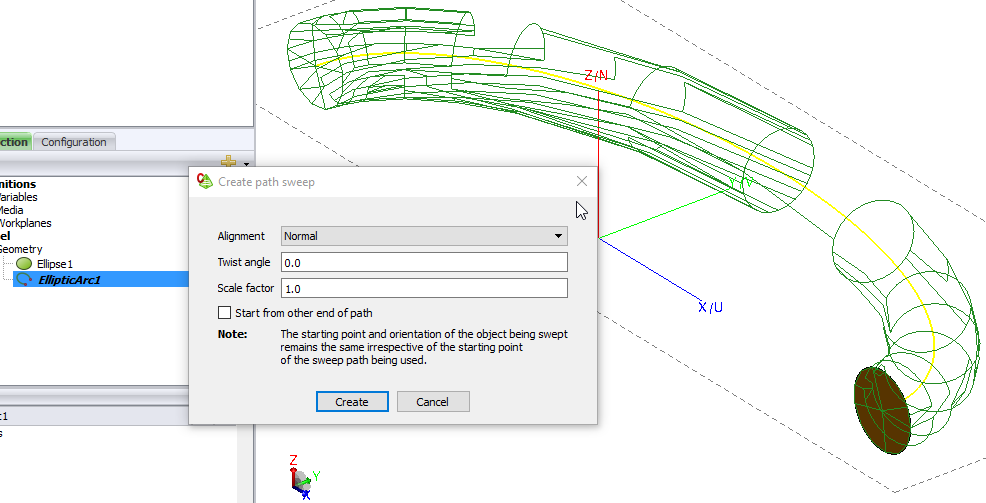
Draw an elliptic arc for example. Then draw an ellipse or circle at the tip of the arc and use path sweep to complete the toroidal section.
You can also use the anlytical curve in CADFEKO if you have an equation describing the curve.
For a simple torus, you can also use the spin operator (spin a circular disc). The path sweep suggested by Mel is more powerful, but might not be required.
Hello Mel and Jif,
Many thanks for your very helpful replies.
I tried to follow Jif's suggestion first, also following the '19.1 Magnetic-field probe' example in the user manual, however I keep getting the following errors: Error 16989: Impossible spin: cannot determine the spun geometry for the faced body.
Error 16990: Self-intersecting surface: cannot create a body with self-intersecting surfaces from the faced body.
Could you please help me get through these errors and actually manage to complete a spin task? It would be so helpful if you could point out a visual tutorial or attach a few screenshots for creating the section. Thanks a lot,
Pelin
Attaching an example of using pathsweep or spin options.
Unable to find an attachment - read this blog
Thanks so much for this very helpful example, Mel.
Hello again, I am trying to union a torus with a cylinder perpendicular to it and keep getting the following error:
Error 16116: Parasolid error: The Parasolid function PK_BODY_boolean_2() returned PK_ERROR_boolean_failure (1058) with severity: SERIOUS (2). File: src\union\gaia_UnionOperator.cpp, Line: 226 The geometry modeller encountered a problem. What could be the issue? How can I union these two objects? Please see the file and the error screenshot attached. Thanks,
<?xml version="1.0" encoding="UTF-8"?>
I noticed the feedNeg part slightly protrudes the torus. Move it slightly further inward.
Try then to Union.
Else, try the following:
Select both FeedNeg and FeedPos and subtract from Spin1.
Then select both FeedNeg and FeedPos (they are now child parts of Subtract1) and right click to Copy (duplicate).
Now Union all the parts.
Join us for a community conversation on how High-Performance Computing (HPC) and Simcenter PSIM work together to meet the increasing demands of modern power electronics simulation. During this one-hour technical session, you'll discover how leveraging HPC can speed up simulations, improve scalability, and empower engineers…
Join us for a community conversation on accelerating your motor simulation workflow with Simcenter Simlab. In this beginner-friendly session, we'll introduce the platform's automated model-building capabilities and show how easy it is to set up your first electric motor analysis. You'll see the basic steps of geometry…
Join us for a Community Conversation where we'll discuss practical approaches to analyzing complex electromagnetic models using hybrid solver techniques. This session will provide a general overview of how different computational methods can be combined within a single simulation to address models containing varied…