The Siemens Community Catalyst program was co-created with our community to acknowledge technology leaders who consistently contribute to the Siemens Community. Nominations are accepted on a rolling basis.
Hi! There is someone who knows how to export all the ray paths after the Propagation Simulation using the Dominant Path Model?
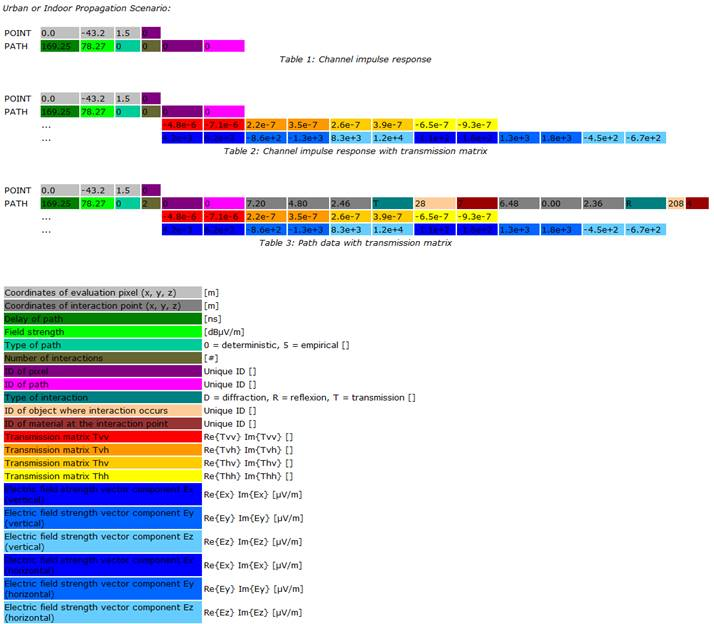
The ray paths computed in ProMan (with the ray tracing models or the dominant path model) can be exported by activating the propagation path output under the Propagation tab. Then the rays are written to a file with suffix *.str. The syntax of this ASCII *.str file is described in the ProMan user manual (if you search for ’str file’), please see the figure below. In ProMan it is also possible to display the computed rays together with the results (e.g. Rx power or pathloss). For this purpose you can use the ray buttons on the upper part of the tool bar on the right.
Join us for a community conversation on how High-Performance Computing (HPC) and Simcenter PSIM work together to meet the increasing demands of modern power electronics simulation. During this one-hour technical session, you'll discover how leveraging HPC can speed up simulations, improve scalability, and empower engineers…
Join us for a community conversation on accelerating your motor simulation workflow with Simcenter Simlab. In this beginner-friendly session, we'll introduce the platform's automated model-building capabilities and show how easy it is to set up your first electric motor analysis. You'll see the basic steps of geometry…
Join us for a Community Conversation where we'll discuss practical approaches to analyzing complex electromagnetic models using hybrid solver techniques. This session will provide a general overview of how different computational methods can be combined within a single simulation to address models containing varied…